Offline means the file never has to leave
An offline PDF app is the right search when the document is a contract, a tax form, an ID scan, or anything you do not want to drop into a website. Upload tools can be convenient. They are the wrong default for a file you would not email to a stranger.
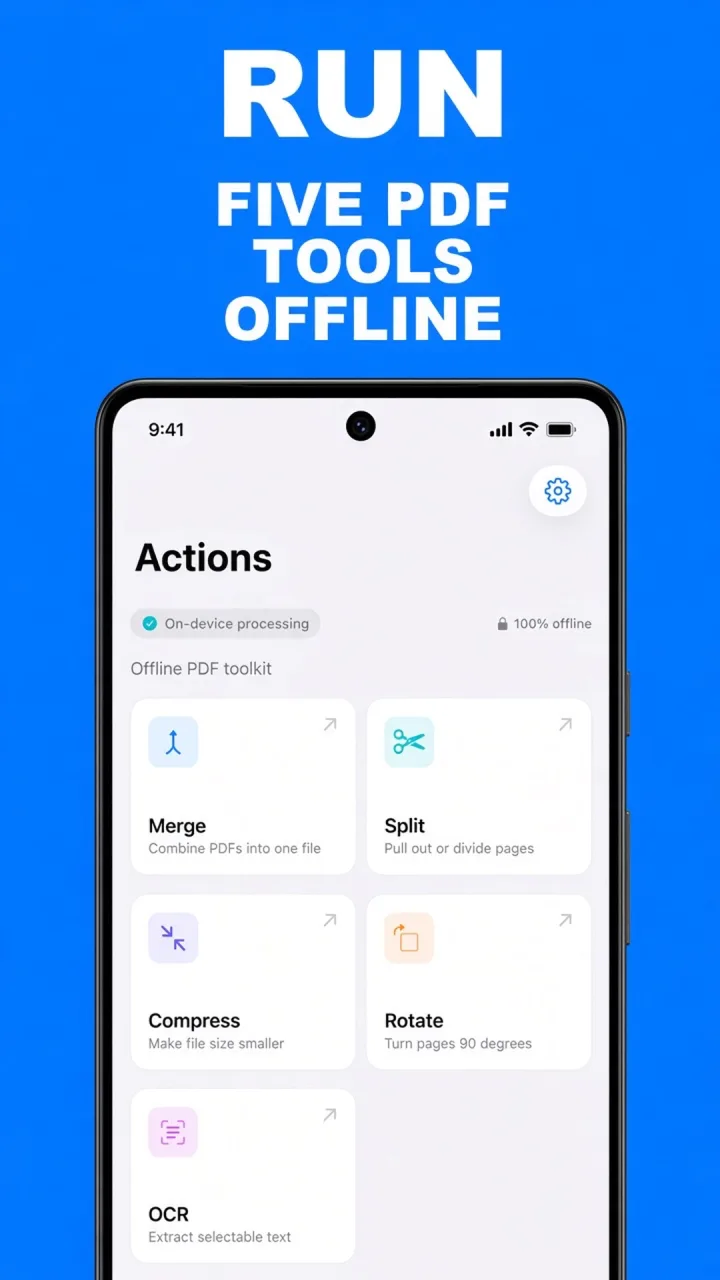
ViaPDF is built the other way. The Play listing states it directly: tools run on your device, there is no account, and there is no cloud upload. The Actions screen says the same thing in the product: on-device processing, 100% offline.
What stays on the phone
- The PDF you open from Files, or share into the app.
- The merge, split, compress, rotate, and OCR results, until you Share or Save.
- Recent files, which you can filter by name. The list is capped at the last 100 so search stays useful.
Google Play’s data-safety section for this listing says no data is collected and no data is shared with third parties. The privacy policy is linked from Settings inside the app and from the footer here.
Sharing is still your choice. When you tap Share, Android’s share sheet sends the file where you point it. ViaPDF does not post it for you.
How to use ViaPDF offline
- Install from Google PlayDownload ViaPDF. You can skip the short introduction. It does not ask you to create an account.
- Open a PDF from the phonePick a tool, then choose a file from Files, or share a PDF into ViaPDF from another app.
- Work offlineAirplane mode is fine. Merge, split, compress, rotate, and OCR do not contact a server to process the file.
- Export on purposeShare or Save is the moment a copy can leave the phone, and only to the app you pick. The first export is free.
- Unlock later if you wantA one-time purchase unlocks unlimited exports. The store may use a connection to confirm that purchase. The PDF tools themselves still run on the device.
Do this job on your phoneFree to download. The first export is free. Then $14.99 once. The file stays on the device until you share it.
An offline PDF app FAQ
Does ViaPDF collect my PDFs?
The Play data-safety form for ViaPDF declares no data collected and no data shared with third parties. Files are processed on the device.
Do I need a signal to compress or merge?
No. You need a connection to download the app, and the store may need one to complete a purchase. The tools do not.
Where is the privacy policy?
Settings includes the privacy policy and the terms of use. The same policy is published at the link in the footer of this page.