Where do deleted photos go on Android?
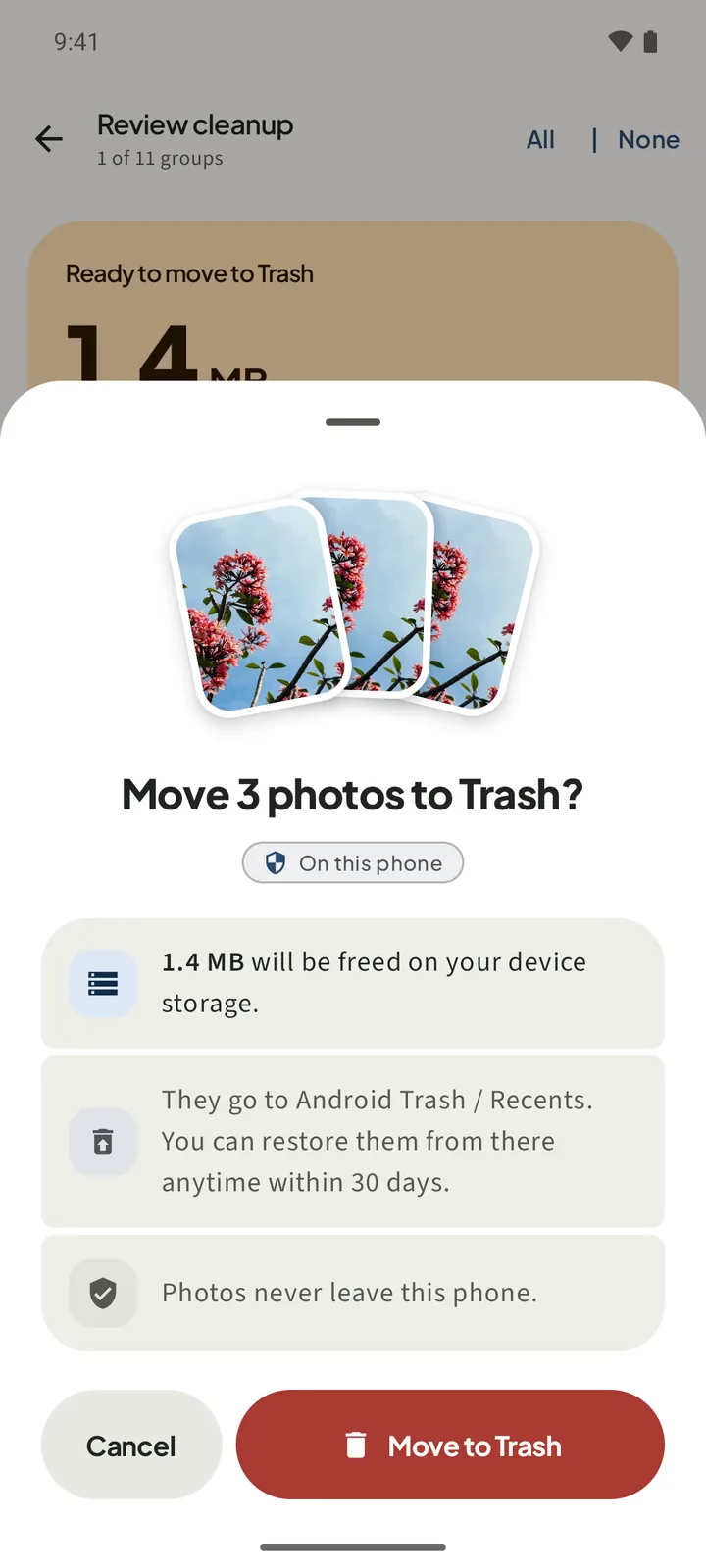
Where do deleted photos go on Android? When you confirm a delete in SparePix, the photos go to the phone's own Trash, not to a folder inside the app. On Android 11 and later they stay there for 30 days, and you can bring them back from the Trash during that time.
SparePix has no restore screen. Recovery happens in the gallery app on your phone, so this guide walks through that app and its Trash.
Check your Android version first
The confirm sheet changes with the Android version. Read it before you tap the button.
- Android 11 and later: the sheet asks Move followed by the count and to Trash?, and the button says Move to Trash. The sheet says the photos can be restored within 30 days.
- Android 10 and older: the title reads Delete the count and permanently?, and the button says Delete permanently. The sheet says the photos cannot be restored from Trash.
How to restore deleted photos from the Trash
- Open the gallery appUse the app your phone uses for photos, such as Google Photos or Samsung Gallery.
- Open the TrashIn Google Photos, tap Library or Collections, then Trash. In Samsung Gallery, open the menu, then Recycle bin. Names differ by phone and version, so look for Trash or Recycle bin.
- Select the photosPick the photos you want back. Leave the others where they are.
- Tap RestoreRestore takes the selected photos out of the Trash.
- Check your libraryOpen your library and check that the photos are there.
Act within 30 days. After 30 days the phone removes photos that are still in the Trash, and SparePix cannot bring them back.
What cannot be recovered
Once a photo leaves the Trash, SparePix cannot get it back. That happens in three cases:
- The Trash was emptied, either by you or from the gallery app.
- The 30 days have passed.
- The delete was on Android 10 or older, where the confirm sheet already said it was permanent.
The app does not upload your library, so it has no cloud copy to fall back on. The only other copy is one you made yourself, such as a backup on a computer or in a photo account you already use.
How to get photos back without SparePix
You do not need SparePix to recover a photo you deleted by hand in the gallery app. Start with that app's Trash, then check any copy you made earlier.
- Look in the gallery app's TrashPhotos you deleted by hand usually wait in the same Trash. Use the names from the steps above, because they differ by phone.
- Check your backupsIf the photo is not in the Trash, look for a copy from a computer backup or a photo backup you turned on earlier.
- Accept the loss if nothing is leftIf there is no Trash entry and no backup, the photo is gone from the phone.
Questions about recovering photos
Where do deleted photos go on Android?
On Android 11 and later, a confirmed SparePix delete moves the photos to Android Trash / Recents. They stay there for 30 days. On Android 10 and older the delete is permanent after you confirm.
How long do photos stay in the Trash?
The confirm sheet and the Home screen both say 30 days on Android 11 and later. After that the phone removes the photos, and SparePix cannot bring them back.
Can SparePix restore photos for me?
No. SparePix has no restore screen. Open the Trash in your gallery app and restore the photos from there.
Does the space come back as soon as I delete?
Not right away. The cleaned screen says the space comes back when Trash is emptied, and the photos wait there for 30 days.
Can I undo a delete on Android 10?
No. On Android 10 and older the confirm sheet says the delete is permanent and the photos cannot be restored from Trash. Check the photos before you tap Delete permanently.
Related: delete duplicate photos, delete old screenshots, and free up space from photos.
Review before anything movesScanning and reviewing are free. The confirm sheet shows the count, the MB and where the photos go before anything moves to Trash.