Bursts, retakes and re-saves all look alike
Most phones fill up with near-copies. A burst is a run of frames taken in a second or two. A retake is another try at the same shot, taken a little later. A re-save is a photo saved again, often after a crop or an edit. These are usually different files, so a plain file match will not find them.
SparePix compares the pictures on your phone, groups the similar ones, and suggests one to keep.
How SparePix picks the suggested photo
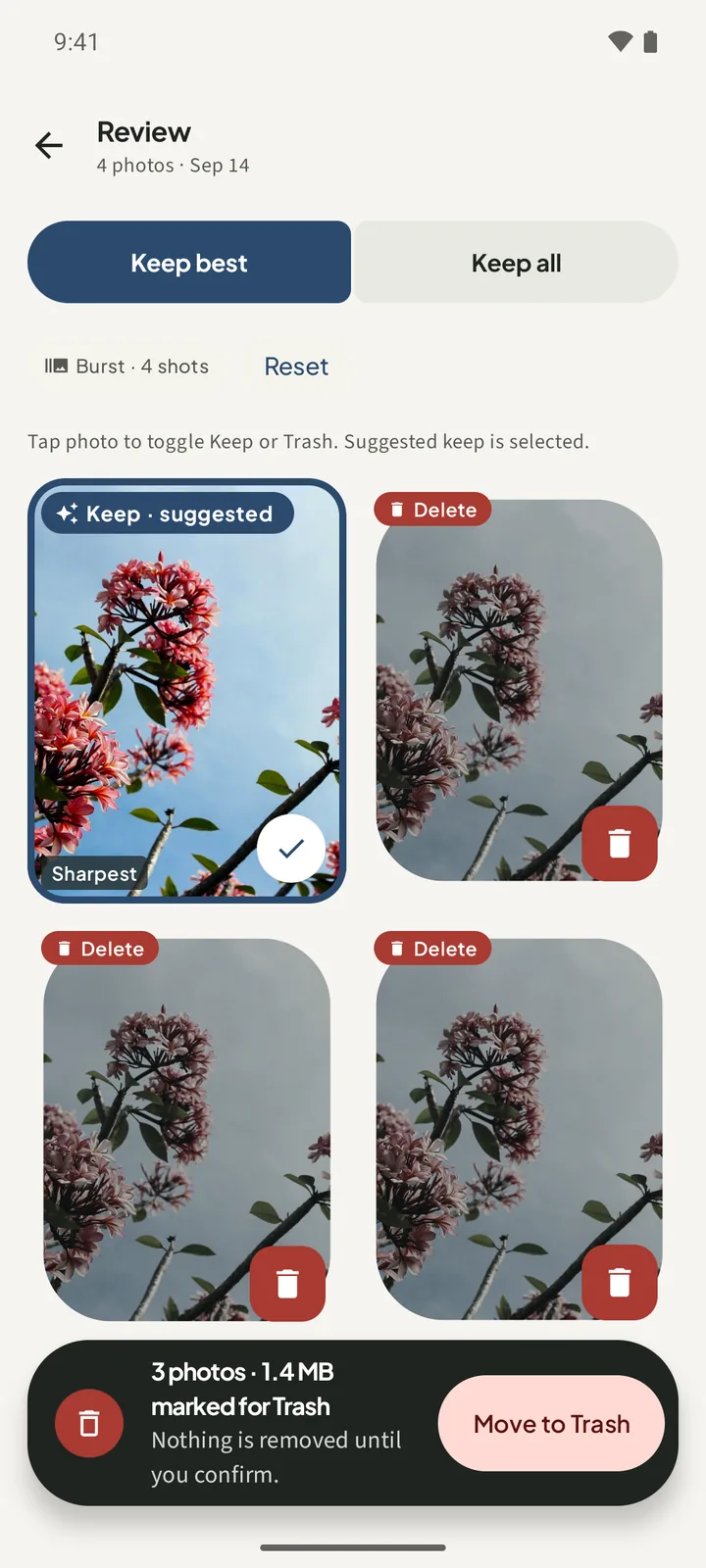
Every similar group has one photo marked Keep · suggested. The app chooses it in this order:
- The photo with the most pixels, meaning the largest width times height.
- If two photos tie, the one with the larger file.
- If they still tie, the sharper one.
The suggested tile also shows a Sharpest tag, but the order above makes the pick. Sharpness only breaks ties, so the suggested photo is not always the best-looking frame.
How to find similar photos in SparePix
- Allow accessTap Allow all, or Select photos to scan only the photos you pick. SparePix scans only what you grant.
- Scan your photosOn Home, tap Scan photos. When the scan finishes, the Similar shots card shows the number of groups and the MB to review.
- Open a groupTap Review similar on the Similar shots card, then open one group from the list.
- Find the suggested photoLook for the tile marked Keep · suggested. For a similar group, the header shows a chip such as Burst · 4 shots.
- Change the choiceTap any photo to switch it between Keep and Delete. Press and hold a photo to open it on its own, then tap Keep this shot or Mark delete.
- Confirm the deleteThe bar at the bottom shows how many photos and MB are marked. Tap Move to Trash, read the count and MB on the sheet, then tap Move to Trash again.
Above the grid, Keep best sets the group back to the suggested photo and marks the rest for Trash. Keep all clears every mark, so every photo stays. Reset also puts the group back to the suggested choice.
Two photos that look alike can be two moments
Similar means the pictures look close. Two photos of the same flower, the same street or the same plate of food can look alike and still be taken minutes or days apart. The grouping does not use the time a photo was taken, so one group can hold two moments.
The cleanup screen says it plainly: similar shots "can group photos that only look alike." Before you mark a frame for Trash, check it.
- Check the time each photo was taken in your gallery app.
- Press and hold a photo in SparePix to open it on its own. The Inspect screen shows the photo number, the size and the pixel dimensions. It does not show the time.
- If you are not sure about a group, use Keep all on it. Every photo in that group stays.
How to find similar photos without SparePix
Your gallery app can do the job by hand. Nothing groups near-copies for you, so expect it to take longer.
- Go to the dayOpen your gallery app and find the day the photos were taken. Bursts and retakes often sit next to each other in the grid.
- Look at each setOpen the first frame, then move through the rest.
- Check the timesRead the time in each frame's details. Frames a few seconds apart usually belong to one burst.
- Select and deleteSelect the frames you do not need and use the delete icon. Do one set at a time.
- Check the TrashLook in the Trash or Recently deleted album of your gallery app, and restore anything you still need before it is removed.
The manual way costs time, and it does not show how many MB you would free.
Find similar photos on Android FAQ
Why does SparePix suggest the photo it does?
It picks the photo with the most pixels first, then the larger file, then the sharper one. The Sharpest tag appears on that photo, but sharpness only settles a tie.
Can two photos that look alike be from different moments?
Yes. The grouping compares the pictures, not the time they were taken. Check the time in your gallery app before you mark one for Trash.
Can I keep more than one photo from a group?
Yes. Tap each photo you want to keep until it shows Keep. Keep all keeps every photo in the group.
Does Inspect show when a photo was taken?
No. Inspect shows the photo number, the file size, the pixel size and a Sharpest frame tag when it applies. Use your gallery app to see the time.
Why is a photo missing from every group?
SparePix scans only the photos you allow. Very plain pictures, such as a flat colour, are often left ungrouped.
Related: delete duplicate photos, clean up burst photos, and recover deleted photos from Trash.
Try it on your own photosScanning and reviewing are free, with 15 free deletes in total. A one-time unlock removes the limit. The comparing stays on the phone.