The built-in ways, and where they stop
- A Clock alarm with a label. Open the Clock app, set an alarm and type a label such as “Call the bank”. It rings loudly, but it’s an alarm, not a reminder: it isn’t in a list, and once you dismiss it, it’s gone.
- A reminder in Google Calendar or Google Tasks. It sits in a list, but it usually arrives as a normal notification with the notification sound, once.
What most people want is in between: a reminder, with the text and a list, that rings with the alarm sound and doesn’t stop at one ring.
What Insisto does
Every reminder in Insisto can Ring like an alarm. It then uses the alarm sound instead of the notification chime, and with Break through Do Not Disturb on, it rings when the phone is silenced. And like every Insisto reminder, it asks again every few minutes until you tap Done.
How to set a reminder with an alarm in Insisto
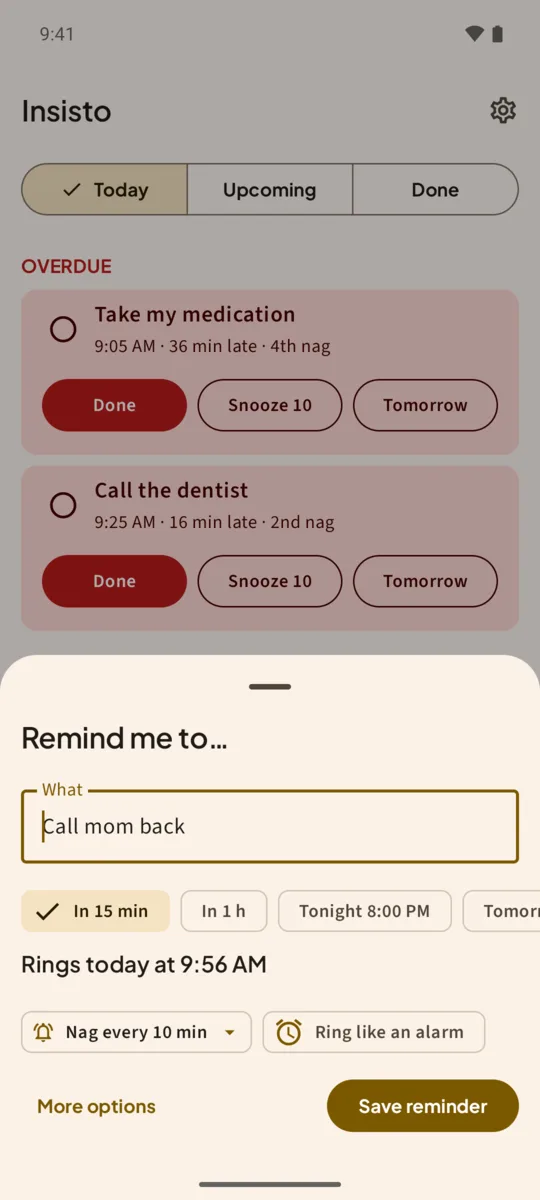
- Tap Remind meThe Remind me button is at the bottom right of Today. The Remind me to… sheet opens.
- Type what to rememberType it in What, for example “Take the cake out”.
- Pick a timeTap In 15 min, In 1 h, Tonight or Tomorrow, or Pick date and time. Insisto shows when it rings, such as Rings today at 9:56 AM.
- Tap Ring like an alarmThe chip below the time turns the reminder into an alarm. Nag every 10 min is already set next to it.
- Save reminderTap Save reminder. At the time you set, it rings with the alarm sound.
- For Do Not Disturb, open More optionsTap More options (or open the reminder later) and turn on Break through Do Not Disturb. If Android asks, allow Override Do Not Disturb for the Reminders that ring like an alarm channel.
When it rings
The notification shows the reminder with three buttons: Done, Snooze 10 and Tomorrow. If you do nothing, Insisto rings again at your interval, and the notification says which nag it is and when it will ask again. After 2 hours (or the time you choose in Give up after), it stops ringing and leaves the last notification until you tap Done.
Test it before you rely on it. Some phones, Samsung and Xiaomi above all, silence apps to save battery. In Insisto, open Settings and tap Send a test reminder in 10 s, then lock the phone. If it doesn’t ring, see reminders not working on Samsung or on Xiaomi.
Alarm reminders and Do Not Disturb
Only reminders set to ring like an alarm can break through Do Not Disturb, and only if you allow it. Normal reminders stay quiet when the phone is silenced, as they should. That way you can keep Do Not Disturb on at night and still hear the one reminder that can’t wait.
One notification is easy to swipe away.Insisto rings on time, then every few minutes until you tap Done. Free for 3 nagging reminders; unlimited is a one-time purchase, and Google Play shows your local price.
Reminder with alarm: questions
Will an alarm reminder ring when my phone is on silent?
With Break through Do Not Disturb on and Override Do Not Disturb allowed for the alarm reminders channel, yes. Without it, it follows your phone’s sound settings.
Can I make every reminder an alarm?
Yes, turn on Ring like an alarm for each one. Most people keep it for the few that matter, so the alarm sound means something.
Does it show a full-screen alarm?
No. It rings with the alarm sound and shows a notification with Done, Snooze 10 and Tomorrow, which also works from the lock screen.
Does an alarm reminder count against the free version?
The free version allows 3 reminders that nag at a time. Ring like an alarm doesn’t change that: a reminder set to Ring once doesn’t count at all.