Why a single reminder isn’t enough for medication
Most missed doses aren’t forgotten at the moment the reminder rings. They’re postponed: “after this call”, “after dinner”. Then the notification is gone. A reminder that repeats until you tap Done keeps coming back until you actually take it, and Done records when you did.
What Insisto is, and isn’t
Insisto is a reminder app, not a medication tracker. It doesn’t know your medication, doses or refills, and it doesn’t give health advice. It does one thing well: it rings at the time you set and keeps asking until you mark it done. Follow your doctor’s or pharmacist’s instructions for what and when to take.
How to set a medication reminder in Insisto
- Tap Remind meType the reminder, for example “Take my medication”. On an empty Today list, the Take medication suggestion fills it in.
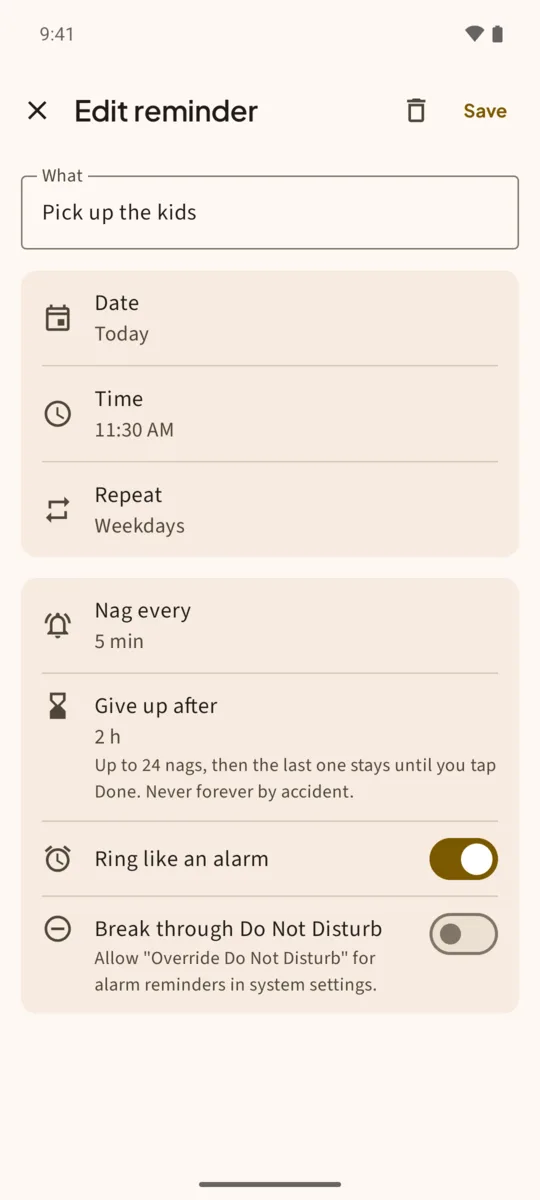
- Pick the time, then More optionsPick a time chip or any time, then tap More options to open the full editor.
- Set Repeat to DailyUnder Repeat choose Daily, or Weekly on chosen days, or Every N days, to match your schedule.
- Choose Nag every10 minutes is the default. Choose 5 for a shorter wait, or 15 or 30 if you need longer.
- Set Give up afterHow long it should keep asking: 2 hours by default, up to 24 hours. The last notification stays until you tap Done.
- Turn on Ring like an alarm (optional)For doses you can’t miss, use the alarm sound, and Break through Do Not Disturb for night doses. Tap Save.
Every day after that
Each day the reminder rings at the same time. If you tap Done, it’s logged in the Done list and Insisto sets tomorrow’s. If you miss it, it stays in the red Overdue section with how late it is, until you tap Done. Snooze 10 helps when you need ten more minutes; Tomorrow skips to the same time tomorrow.
Two or three doses a day
Make one reminder per dose: “Morning pill” at 8:00 and “Evening pill” at 20:00, both daily. The free version allows 3 reminders that nag at a time, which covers up to three daily doses; unlimited is a one-time purchase.
Make sure it rings on your phone. Samsung and Xiaomi phones can silence reminder apps to save battery. Insisto’s setup walks you through it and sends a test reminder in 10 seconds. See Samsung and Xiaomi.
One notification is easy to swipe away.Insisto rings on time, then every few minutes until you tap Done. Free for 3 nagging reminders; unlimited is a one-time purchase, and Google Play shows your local price.
Medication reminder: questions
Can I see if I took my medication today?
Yes. Tap Done when you take it, and it appears under Done today on Today and in the Done list. A missed one stays in Overdue.
Does Insisto track doses, pills left or refills?
No. It’s a reminder app. It reminds you, and asks again until you mark it done.
Can it remind me for someone else?
It reminds whoever holds the phone. Install it on the phone of the person who takes the medication.
Will it ring at night with Do Not Disturb on?
Only if you turn on Ring like an alarm and Break through Do Not Disturb for that reminder, and allow it in Android’s settings.