The repeats you can choose
- Daily: every day at the same time. Medication, a walk, a journal.
- Weekdays: Monday to Friday. Leave for the bus, start the timesheet.
- Weekly: on the days you choose, for example Tuesday and Friday for the bins.
- Every N days: every 2, 3 or more days. Water the plants, change the contact lenses.
- Monthly: on a day of the month. Rent, bills, a card payment. Months without that day (the 31st in April) ring on their last day.
Why repeats should nag too
A monthly bill reminder that rings once is easy to dismiss on a busy morning, and then it’s a month until the next one. In Insisto, a repeating reminder asks again every few minutes until you tap Done, just like a one-off. Done sets the next one.
How to make a reminder repeat in Insisto
- Tap Remind me and type itFor example “Pay the electricity bill”.
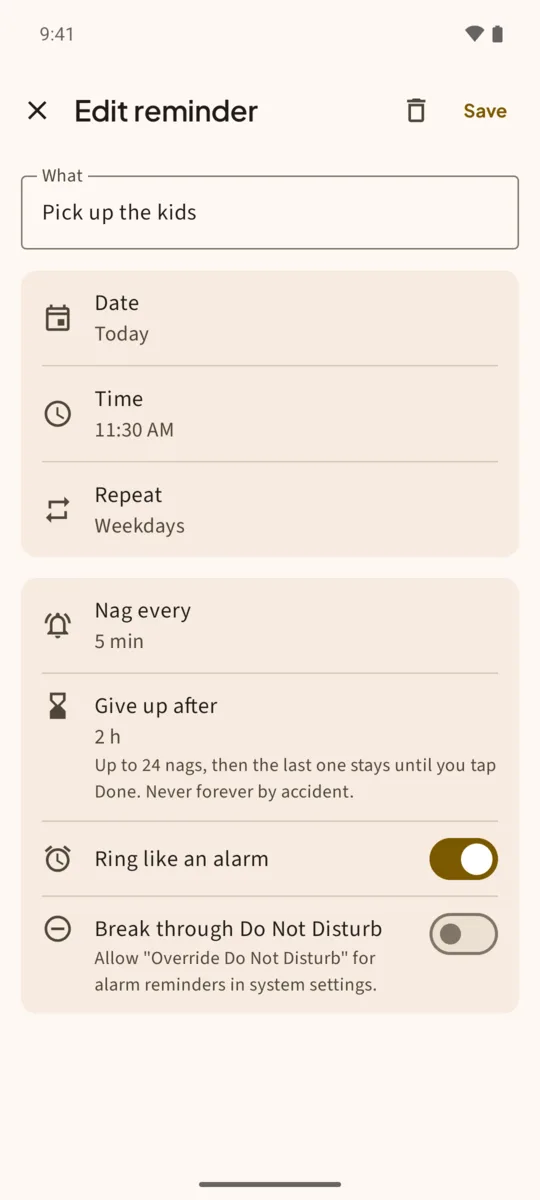
- Tap More optionsThe full editor opens with Date, Time and Repeat.
- Pick the date and timeFor a monthly bill, pick the day it’s due, or a couple of days before.
- Tap Repeat and chooseOnce, Daily, Weekdays, Weekly, Every N days or Monthly. Weekly lets you tick the days; Every N days lets you set the number.
- Set Nag every and Give up afterHow often to ask again, and for how long. A bill might nag every 30 minutes for 12 hours.
- SaveThe reminder shows its repeat in the list, such as weekdays or monthly, day 1.
What happens when you’re late
If you tap Done late, Insisto continues from now: it sets the next occurrence and never replays the ones you missed. A daily reminder done at 11 PM still rings tomorrow at its usual time.
See what’s coming
The Upcoming tab lists the next reminders with their dates. The Next reminder widget shows a countdown to the next one on your home screen, and the Today widget shows today’s list with late ones first.
Moving phones? Settings > Export reminders to a file saves every reminder and its repeat. Import from a file on the new phone.
One notification is easy to swipe away.Insisto rings on time, then every few minutes until you tap Done. Free for 3 nagging reminders; unlimited is a one-time purchase, and Google Play shows your local price.
Recurring reminders: questions
Can a reminder repeat on the last day of the month?
Pick the 31st and choose Monthly: months without a 31st ring on their last day.
Can I repeat every two weeks?
Use Every N days and set 14.
Do recurring reminders count against the free version?
A repeating reminder that nags is one of the 3 free nagging reminders, however often it repeats. Set to Ring once, it doesn’t count.
How do I skip one day?
When it rings, tap Tomorrow. It moves that occurrence to the same time tomorrow.