Why one notification isn’t enough
A normal reminder treats “seen” as “done”. The moment you swipe it, it’s gone, whether you did the thing or not. That works for some people. For anyone who gets distracted, is busy with kids, or has ADHD, the reminder needs to come back.
What “repeat until done” means
- The reminder rings at the time you set.
- If you don’t answer, it rings again after a few minutes, and again, at the interval you chose.
- It stops when you tap Done, push it back with Snooze 10 or Tomorrow, or when the give-up time runs out.
Android’s own reminders and most to-do apps don’t do this. Insisto is built around it: every reminder asks again every 10 minutes unless you change it.
How to set a reminder that repeats until done
- Tap Remind me and type itOn Today, tap Remind me and type what to remember in What.
- Pick a timeIn 15 min, In 1 h, Tonight, Tomorrow, or any date and time.
- Check the nag intervalThe chip says Nag every 10 min. Tap it to choose every 1, 5, 10, 15, 30 or 60 minutes, or Ring once.
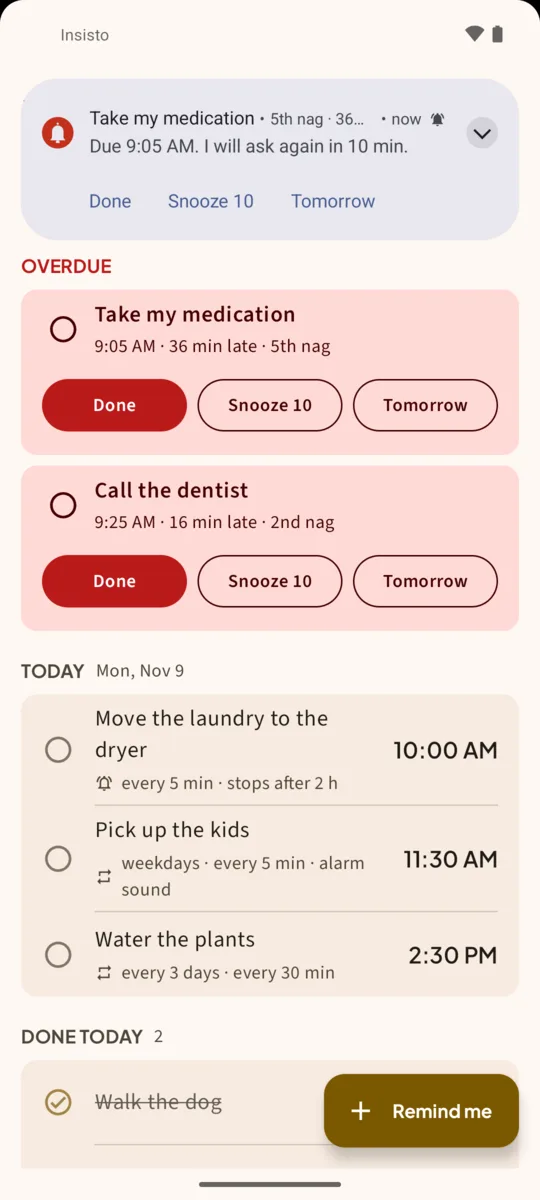
- Save reminderAt the time you set, it rings. If you ignore it, the notification comes back: 2nd nag, 3rd nag, with when it will ask again.
- Answer itTap Done when it’s done. Snooze 10 asks again in 10 minutes. Tomorrow moves it to the same time tomorrow.
- Change when it gives up (optional)Open the reminder and set Give up after: from 30 minutes to 24 hours. The default is 2 hours.
It never nags forever by accident
Every reminder has a give-up time. After it, Insisto stops ringing and leaves the last notification in place until you tap Done. On Today, the reminder stays in the red Overdue section on top, with how late it is and how many times Insisto asked, so you still see it next time you open the app.
Repeating reminders nag too
A reminder that repeats daily, on weekdays or monthly asks again until it’s done each time. When you tap Done, Insisto sets the next one. See recurring reminders on Android.
Free for three. The free version allows 3 reminders that nag at a time, and unlimited reminders that ring once. If three is enough for the things you keep forgetting, you never have to pay.
One notification is easy to swipe away.Insisto rings on time, then every few minutes until you tap Done. Free for 3 nagging reminders; unlimited is a one-time purchase, and Google Play shows your local price.
Repeat until done: questions
How often does Insisto remind me again?
Every 10 minutes by default. You can choose every 1, 5, 10, 15, 30 or 60 minutes per reminder, or Ring once. Settings has the default for new reminders.
Can I stop it from the lock screen?
Yes. Done, Snooze 10 and Tomorrow are on the notification, including on the lock screen.
What happens if I ignore it completely?
It keeps asking until the give-up time (2 hours by default), then stops ringing. The notification and the Overdue card stay until you tap Done.
Does it keep reminding me if I restart the phone?
Yes. Insisto sets every reminder again when the phone starts.