What Due users miss on Android
Due’s idea is simple: a reminder isn’t finished until you say so. It keeps repeating until you mark it done. Android’s built-in reminders, and most Android to-do apps, notify once and move on.
What carries over in Insisto
- Auto-repeat: every reminder asks again every 1, 5, 10, 15, 30 or 60 minutes until you tap Done.
- Quick add: In 15 min, In 1 h, Tonight and Tomorrow chips, or any date and time.
- Repeats: daily, weekdays, chosen days, every N days, monthly. Repeating reminders nag too.
- Answer from the notification: Done, Snooze 10 and Tomorrow.
- Pay once: a one-time purchase, no subscription.
What’s different
- No typed dates (“tomorrow at 9”) yet: you pick the time with chips or a picker.
- No timers in this version.
- No sync between devices: reminders stay on the phone, and Insisto has no internet permission. Export to a file to move them.
- Android-only work Due doesn’t need: battery setup for Samsung and Xiaomi, so reminders actually ring.
How to set up Insisto if you used Due
- Install Insisto and go through Make sure it ringsAllow Notifications and Alarms and reminders, set Battery to not optimized, and run Test it now with the phone locked.
- Set your default nagSettings > Defaults for new reminders: Nag every and Give up after. Pick what you used in Due.
- Add your remindersTap Remind me, type, pick a time, Save reminder. Use More options for repeats.
- Add the widgetsThe Today widget lists today’s reminders with a Remind me button. Next reminder shows a countdown.
- Add the Quick Settings tileAdd Insisto’s tile to Quick Settings to start a reminder from anywhere with one tap.
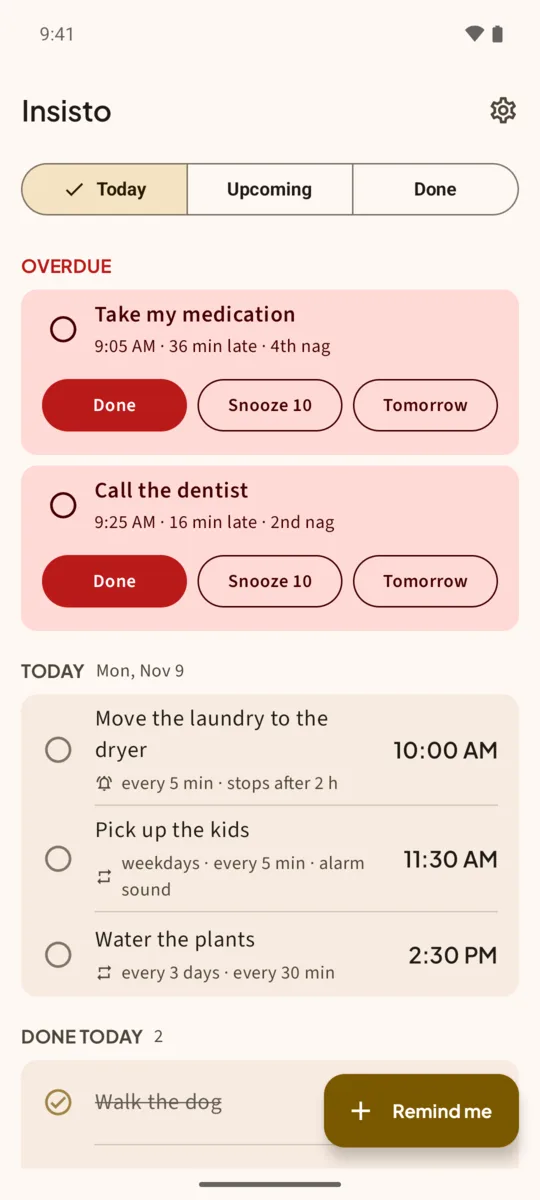
Side by side
- Platform: Due, iPhone and Mac. Insisto, Android.
- Nagging: both repeat until done. Insisto stops by itself after a give-up time you choose (2 hours by default).
- Price: both are a one-time purchase. Insisto is free for 3 nagging reminders at a time.
- Privacy: Insisto has no account and no internet permission.
Insisto is made by Deximo Apps and isn’t related to Due or its developer.
One notification is easy to swipe away.Insisto rings on time, then every few minutes until you tap Done. Free for 3 nagging reminders; unlimited is a one-time purchase, and Google Play shows your local price.
Due for Android: questions
Is there a Due app for Android?
No. Due is available for iPhone and Mac. Insisto is an Android app that works the same way: reminders that repeat until you mark them done.
Can I import my reminders from Due?
Not directly. Add them in Insisto; quick add takes a couple of taps per reminder.
Does Insisto have timers like Due?
Not in this version.
Is it a subscription?
No. It’s free for 3 nagging reminders at a time, and unlimited is a one-time purchase on Google Play.