One attachment is the whole job
Searching combine PDF files usually means you are about to send something: an invoice plus a contract, an application plus a scan of an ID, three receipts a bookkeeper asked for in a single email. Separate attachments get lost. One PDF gets opened.
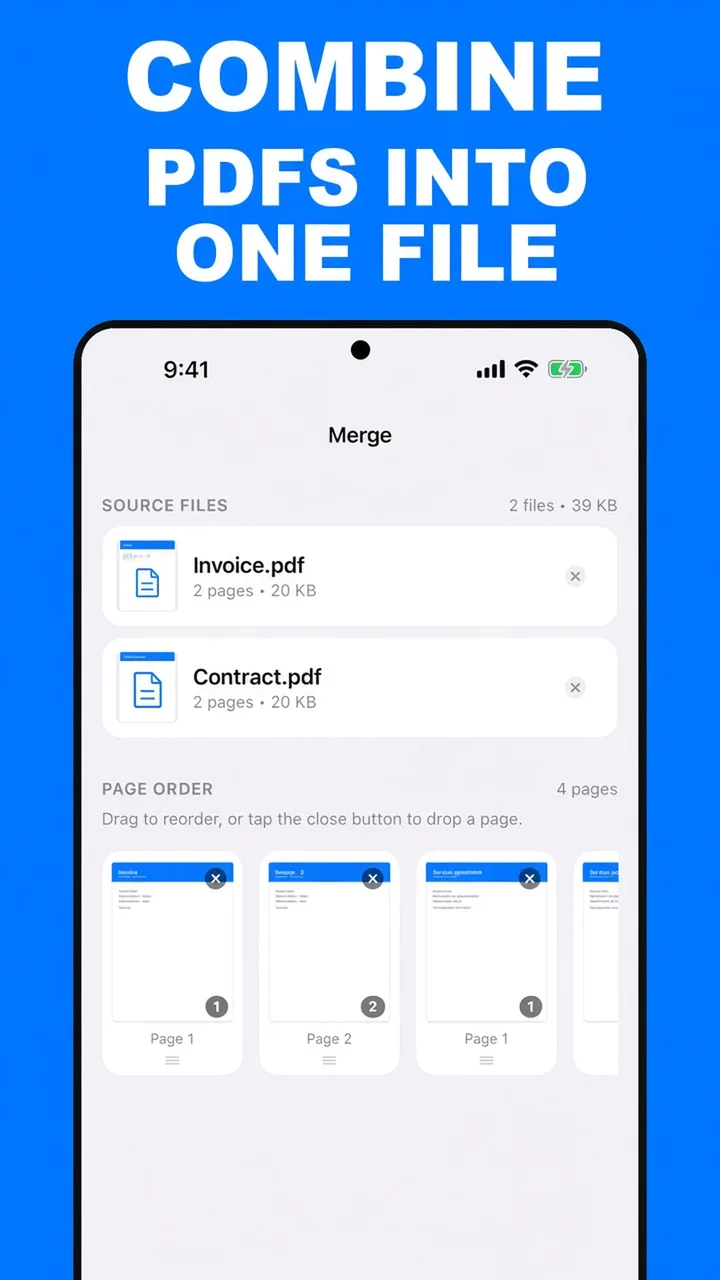
ViaPDF’s Merge tool is built for that packet. You add each file, you see every page, you put them in the order a person will actually read, and you export one PDF. The work happens on your Android phone, offline, with no account.
Build the packet in reading order
The mistake is appending files in the order they happen to sit in Downloads. Put the page a reviewer looks at first at the front. A typical packet:
- The form or the invoice.
- The supporting pages, in the order the form mentions them.
- The signature or the receipt at the end.
The step-by-step for the controls themselves is in merge PDF files on Android. If the finished packet is heavier than the inbox allows, compress it next.
Originals stay put. Combining writes a new PDF. The invoice and the contract you started with are still separate files if you need them later.
How to combine PDFs in ViaPDF
- Collect the filesLeave the PDFs in Files, Drive’s offline copies, or Downloads. You will pick them inside ViaPDF. They are not uploaded to us.
- Open MergeTap Merge on the Actions screen.
- Add every PDF in the packetTap Add PDFs and select the files. The screen shows how many files you added and their total size.
- Put the packet in reading orderMove pages with the arrows. Drop a cover sheet or a duplicate with ×. The person receiving one attachment will read this order.
- Export one fileTap Merge, then Share or Save. One file, one message.
Do this job on your phoneFree to download. The first export is free. Then $14.99 once. The file stays on the device until you share it.
Combine PDF files into one FAQ
Is combine different from merge?
Same tool. Combine is the job: several PDFs become one attachment. Merge is the button that does it.
Can I mix a one-page scan with a long contract?
Yes. Each file’s pages are added to the strip. Reorder them so the scan sits where a reader expects it.
What if the combined file is too big to email?
Compress the result, or extract the pages that have to go in the email. Start with reduce PDF file size.