Android’s built-in notification history
Since Android 11, phones can keep a list of the notifications you received in the last 24 hours, including the ones you dismissed. It is off until you switch it on.
- Pixel and most phones: Settings > Notifications > Notification history, then turn on Use notification history.
- Samsung Galaxy: Settings > Notifications > Advanced settings > Notification history.
- Xiaomi, Redmi and POCO: many models hide this screen. See notification history on Xiaomi.
If you can’t find it, type “notification history” in the search box at the top of Settings.
Where the built-in history stops
- It keeps 24 hours. Yesterday morning’s message is already gone.
- It only starts once you switch it on. Turning it off clears it.
- There is no search, and it can’t show you which apps interrupt you most.
Muto keeps notifications for up to 30 days, lets you filter by app and search the text, and counts interruptions per app. It works next to Android’s own history; you don’t have to turn that off.
How to keep a longer notification history with Muto
- Install Muto and open itSet up Muto lists the permissions it can use and what each one is for. Usage access is for screen time; Notification access is the one the history needs.
- Turn on Notification accessTap Notification access, find Muto in Android’s list and allow it. Muto explains what it stores before Android asks.
- Let notifications arriveFrom now on Muto saves every notification with its app, title, text and time. Notifications that arrived before you set it up don’t come back.
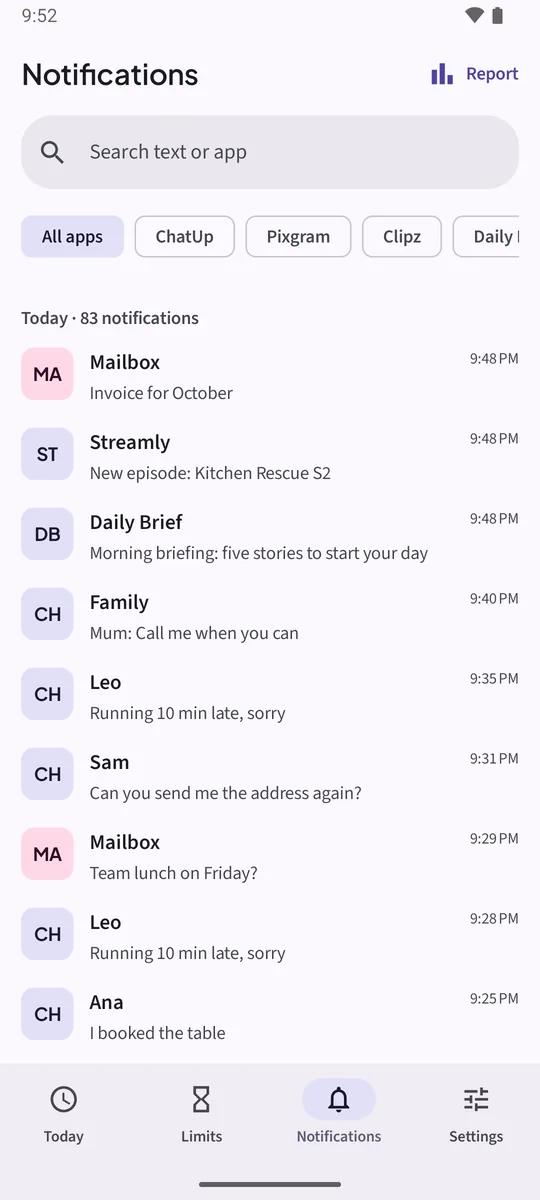
- Open NotificationsTap Notifications at the bottom of Muto. Today and Yesterday are on top, older days below.
- Filter by app, or searchTap an app chip to see only that app’s notifications, or All apps to see everything. In Muto Full, Search text or app finds a word in 30 days of notifications.
- Tidy upSwipe a row to delete it. Long-press an app chip to stop storing that app’s notifications.
Watch it in 22 seconds
The same steps as a short video. It loads from YouTube only when you press play.
What Muto keeps, and for how long
The free version keeps 3 days of notifications. Muto Full, a one-time purchase, keeps 30 days and adds search. In Settings, Auto-delete after sets how long notifications stay before Muto deletes them.
Ongoing notifications such as music, navigation and downloads are not stored. Neither are apps you exclude.
Private by design. Notification text can include personal messages and codes. Muto has no internet permission, so it can’t send anything anywhere, and there is no account. Delete all data in Settings removes everything.
See who interrupts you most
Tap Report on the Notifications screen. Interruptions shows how many notifications you got this week, your noisiest hours and the apps that interrupt you most, with a shortcut to put a limit on one of them.
Keep the notifications. Know where the time goes.Free to try: 3 days of notification history, 7 days of screen time and one app limit. Muto Full is a one-time purchase, and Google Play shows your local price.
Notification history: questions
How long does Android keep notification history?
24 hours, and only from the moment Use notification history was switched on. Muto keeps up to 30 days with Muto Full, or 3 days on the free version.
Can I see notifications from before I installed Muto?
No. No app can recover notifications that arrived before it had Notification access. Set Muto up now, and it keeps everything from today on.
Does Muto save photos from messages?
No. It saves the text a notification shows. A photo or a voice note appears as the short label the app puts in the notification.
Why are some notifications missing?
Ongoing notifications (music, navigation) and excluded apps are not stored. If nothing new shows up, your phone may have stopped Muto in the background: open Settings > Keep Muto running in Muto.