What Digital Wellbeing does well
- It’s already on your phone, free, and made by Google.
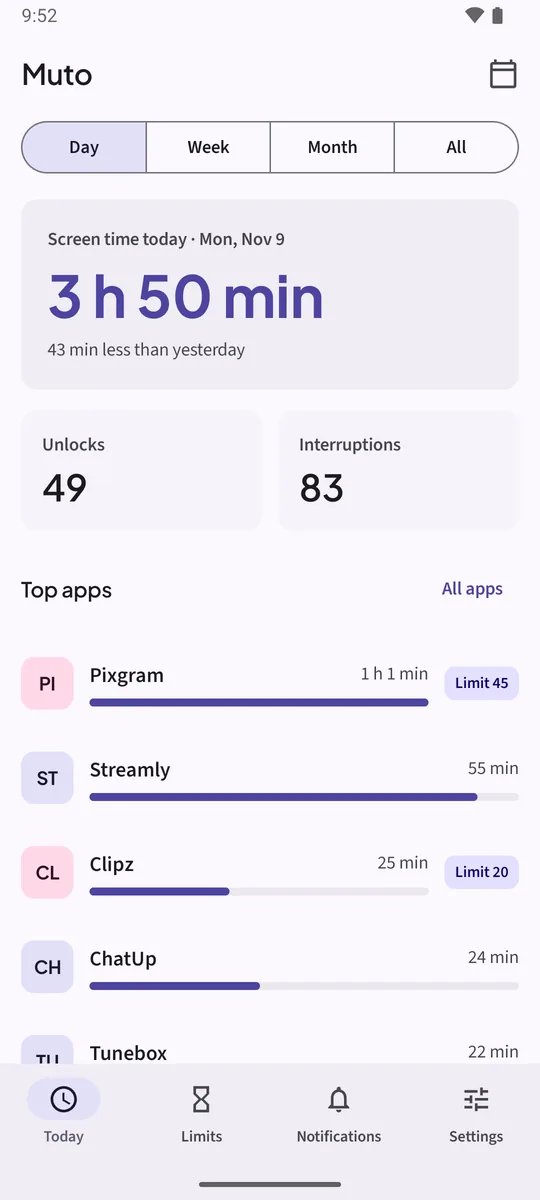
- Today’s screen time, unlocks and notifications at a glance.
- App timers, Bedtime mode and Focus mode.
Where it stops
- History: about a week of day-by-day screen time. Last month isn’t there.
- Timers: easy to remove from the same screen, with nothing in the way.
- Notifications: it counts them, but doesn’t keep them. Android’s separate notification history keeps 24 hours.
How to set up Muto next to Digital Wellbeing
- Keep Digital Wellbeing as it isYou don’t need to turn anything off. Muto reads the same Android usage data and works alongside it.
- Install Muto and allow Usage accessMuto starts saving a copy of every day’s screen time, so the history keeps growing past a week.
- Allow Notification accessEvery notification is saved with its app, title, text and time, and counted in Interruptions.
- Move a timer to a Muto limitTap Limits, then New limit. Add blocked hours or Hard mode with a PIN if a plain timer wasn’t enough.
- Check in once a weekSwitch Today to Week or Month, and tap Report on Notifications to see your noisiest apps and hours.
Side by side
- Screen time history: Digital Wellbeing, about a week. Muto, every day since install (Muto Full; the free version shows 7 days).
- App limits: Digital Wellbeing, a daily timer. Muto, daily minutes or blocked hours, Soft or Hard mode, PIN and cool-off.
- Notifications: Digital Wellbeing, a count. Muto, the notifications themselves, kept up to 30 days, with search in Muto Full.
- Privacy: Muto has no internet permission, no account and no ads.
- Price: Digital Wellbeing is free. Muto is free to try; Muto Full is a one-time purchase, not a subscription.
Digital Wellbeing has things Muto doesn’t try to replace, such as Bedtime mode’s grayscale screen. Keep using them.
Keep the notifications. Know where the time goes.Free to try: 3 days of notification history, 7 days of screen time and one app limit. Muto Full is a one-time purchase, and Google Play shows your local price.
Digital Wellbeing alternative: questions
Do I have to turn off Digital Wellbeing?
No. Muto works alongside it and reads the same Android usage data.
Is Muto made by Google?
No. Muto is made by Deximo Apps, an independent developer. Digital Wellbeing is a Google product.
Does Muto have Bedtime or Focus mode?
Not as such. Blocked hours in a limit block an app at set times, for example every night.
Does Muto need internet?
No. It has no internet permission at all.