Why you can’t find it
Android 11 added a 24-hour notification history. On many Xiaomi, Redmi and POCO phones, MIUI and HyperOS don’t show it in Settings. The screen is often still there, just without a menu entry.
- Search Settings. Open Settings and type “notification history”. Some HyperOS versions list it.
- Open the hidden screen. Apps that open hidden settings screens (often called activity launchers) can open Android’s Notification history screen on many models, where you switch on Use notification history.
Either way you get Android’s history: 24 hours, no search, and nothing from before you turned it on.
Why history apps stop on Xiaomi
Xiaomi phones save battery by closing apps in the background. A notification history app that gets closed stops saving, and you only find out when the message you need isn’t there. The fix is a few battery settings, done once.
How to keep notification history on Xiaomi with Muto
- Install Muto and allow Notification accessOpen Muto and allow Notification access in Android’s list. Muto starts saving every notification with its app, title, text and time.
- Open Keep Muto runningIn Muto, tap Settings, then Keep Muto running. It checks Usage access, Notification access and Battery, and shows when the last notification was saved.
- Battery saver: No restrictionsFollow the first step: open Battery saver for Muto and choose No restrictions.
- Turn on AutostartAllow Muto to start by itself, so it comes back after a restart.
- Lock Muto in recent appsOpen the recent apps screen and lock Muto, so clearing recent apps doesn’t close it.
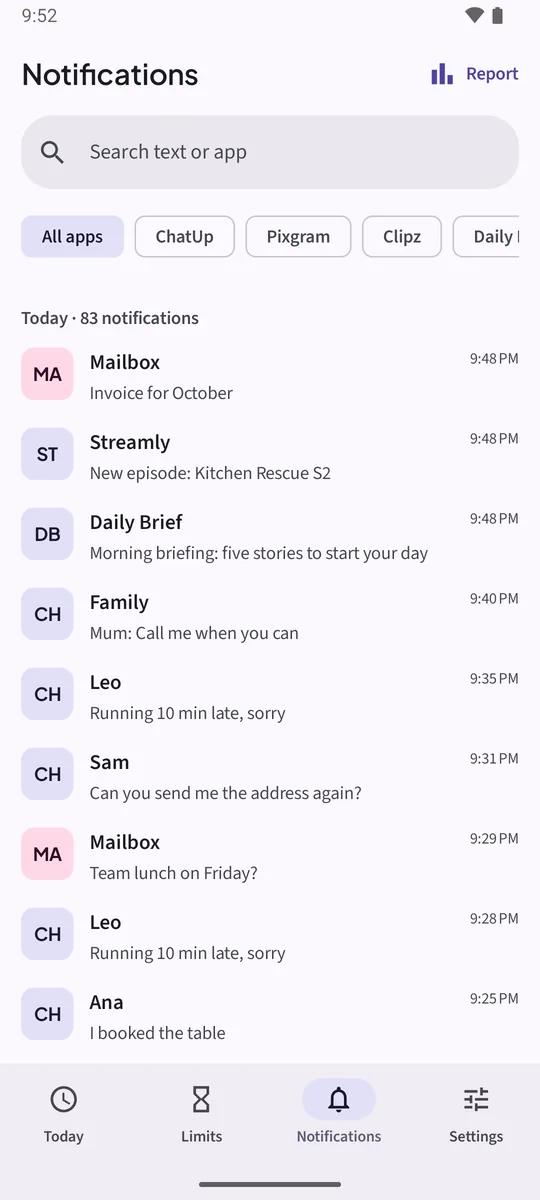
- Read your notificationsTap Notifications in Muto. Filter by app with the chips, or search the text in Muto Full.
If the phone stops Muto anyway
Muto notices when the system stopped it and shows a card: “Your phone stopped Muto”, with how long notifications weren’t saved. Tap Keep Muto running on the card to go through the steps again.
Other brands
Keep Muto running has steps for Xiaomi, Redmi, POCO, Samsung, Huawei, Honor, OPPO, realme, OnePlus and vivo. On most phones the key step is the same: let Muto use the battery freely (Unrestricted, or Don’t optimize).
The free version keeps 3 days of notifications; Muto Full keeps 30 days and adds search.
Keep the notifications. Know where the time goes.Free to try: 3 days of notification history, 7 days of screen time and one app limit. Muto Full is a one-time purchase, and Google Play shows your local price.
Notification history on Xiaomi: questions
Does Xiaomi have notification history?
Android 11 and later include it, but many Xiaomi, Redmi and POCO phones hide the menu entry. When you can reach it, it keeps only the last 24 hours.
Why did my notification history app stop working?
Most likely the phone closed it to save battery. Set Battery saver to No restrictions, turn on Autostart and lock the app in recent apps.
Does this work on HyperOS?
Yes. Keep Muto running shows the steps for your phone: Battery saver set to No restrictions, Autostart on, and Muto locked in recent apps.
Can I see notifications from before I set this up?
No. Muto keeps notifications from the moment it has Notification access.