Why a deleted message can still be read
A new WhatsApp message usually arrives on your phone twice: once in the chat, and once as a notification with the message text. Deleting it for everyone removes it from the chat and clears the notification, but an app that saved the notification text when it arrived still has it.
That is all Muto does: it keeps a copy of each notification on your phone. It doesn’t open WhatsApp, read your chats or connect to anything. Muto has no internet permission.
What works and what doesn’t
- Works: text messages that arrived as a notification while Muto had Notification access, in WhatsApp and other chat apps.
- Doesn’t work: messages from before Muto was set up. No app can bring those back.
- Doesn’t work: messages that never made a notification: a chat you had open at the time, a muted chat, or notifications turned off.
- Doesn’t work: notifications that hide the text. If the notification only says “New message”, that is all there is to keep.
- Doesn’t work: photos, videos and voice notes. You see the label the notification showed, such as “Photo”, not the file.
Android’s own notification history can do the same for 24 hours, if it was switched on. See notification history on Android.
How to read deleted WhatsApp messages with Muto
- Install Muto and allow Notification accessOpen Muto, tap Notification access and allow Muto in Android’s list. Do it now: Muto only keeps messages that arrive after this.
- Keep WhatsApp notifications onLeave WhatsApp notifications on, with the message text showing. Muto can only keep the text the notification shows.
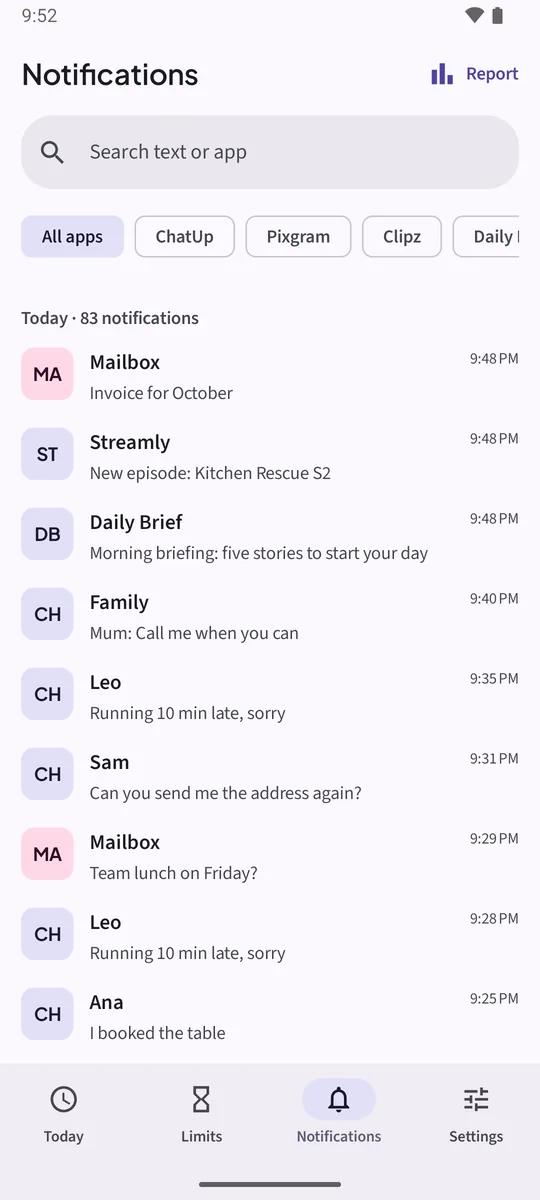
- When a message is deleted, open MutoIn the chat you see “This message was deleted”. Open Muto and tap Notifications.
- Tap the WhatsApp chipThe chip row filters by app. Tap WhatsApp to see only its notifications, newest first.
- Read the messageEach row shows the sender, the text and the time it arrived. In Muto Full, Search text or app finds a name or a word.
Watch it in 16 seconds
The same steps as a short video. It loads from YouTube only when you press play.
How long the messages stay
The free version keeps 3 days of notifications; Muto Full keeps 30 days and adds search. Auto-delete after in Settings sets how long Muto keeps them.
Use it on your own phone. Muto keeps the notifications your phone already showed you. It doesn’t read anyone else’s phone, and the sender isn’t told anything.
Other chat apps
The same works for Telegram, Messenger, Instagram messages, SMS and any app that shows the message text in its notifications. If you never want an app’s messages stored, long-press its chip and choose Exclude.
Keep the notifications. Know where the time goes.Free to try: 3 days of notification history, 7 days of screen time and one app limit. Muto Full is a one-time purchase, and Google Play shows your local price.
Deleted WhatsApp messages: questions
Can I see a WhatsApp message that was deleted yesterday?
Only if Muto (or Android’s own notification history) was already saving notifications when it arrived. Nothing can recover a message whose notification was never saved.
Does this work for deleted photos or voice notes?
No. Muto keeps notification text. For a photo or a voice note you see the label, not the file.
Will the sender know I read it?
No. Muto doesn’t touch WhatsApp. It only keeps a copy of the notification on your phone, and it has no internet permission.
Does it work with WhatsApp Business?
Yes, the same way: any app whose notifications show the message text.
Do I need root or an Accessibility service?
No. Muto uses Android’s Notification access, the same permission smartwatch and notification apps use.