Check screen time with Digital Wellbeing
Most Android phones have it built in: Settings > Digital Wellbeing & parental controls (on Samsung, Settings > Digital Wellbeing and parental controls). The dashboard shows today’s screen time, unlocks and notifications, and the apps you used most.
Why the history stops after a few days
Android keeps detailed, day-by-day usage for a short time, roughly a week, and then keeps only rough totals. That is why you can’t pick a day from last month in Digital Wellbeing.
Muto reads the same usage data from Android, and saves a copy of every day on your phone. From the day you install it, the history keeps growing.
How to see screen time history with Muto
- Install Muto and allow Usage accessOpen Muto and tap Usage access. Android opens its list; allow Muto. This is how Android shares screen time with apps.
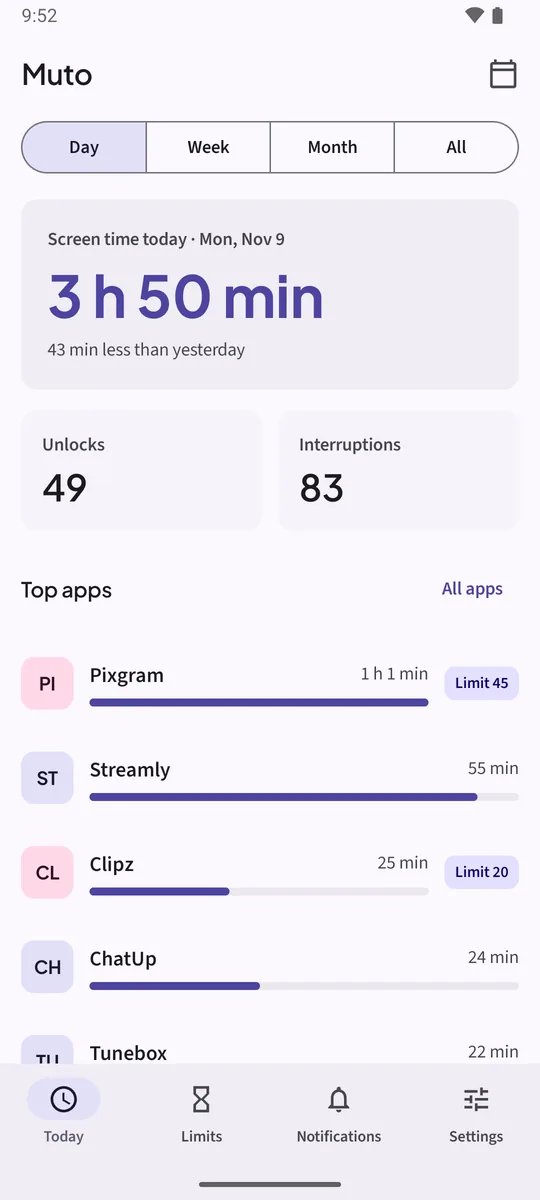
- Read today on TodayToday shows screen time today, how it compares with yesterday, Unlocks, Interruptions and your Top apps.
- Switch to Week, Month or AllUse the Day, Week, Month and All tabs at the top to see the last 7 days, the last 30 days or all time, with a daily average.
- Pick a past dayTap the calendar icon, Pick a day, and choose any day since you installed Muto.
- Open one appTap an app to see its week: screen time per day, launches, notifications and its daily limit.
- Export itIn Muto Full, Settings > Export usage as CSV saves daily totals per app wherever you choose.
Watch it in 23 seconds
The same steps as a short video. It loads from YouTube only when you press play.
How much history you get
The free version shows the last 7 days. Muto Full, a one-time purchase, shows all of it, from the first day: there is no cap. History is stored on your phone only; Muto has no internet permission.
Keep it on the home screen
Add the Screen time today widget for today’s total and your top three apps, or Interruptions today for the noisiest apps.
Want to spend less time in one app? Set a daily time limit from the same screen with Set a limit.
Keep the notifications. Know where the time goes.Free to try: 3 days of notification history, 7 days of screen time and one app limit. Muto Full is a one-time purchase, and Google Play shows your local price.
Screen time history: questions
Why doesn’t Digital Wellbeing show last month?
Android keeps detailed daily usage for only about a week. Muto saves a copy of every day, so its history keeps growing.
Can Muto show screen time from before I installed it?
No. It keeps every day from the day you install it and allow Usage access.
Does it match Digital Wellbeing?
Both read Android’s usage statistics, so the totals are usually close. Small differences can come from how each app counts a session that crosses midnight.
Does Muto count unlocks?
Yes. Today shows Unlocks for the day, and each app shows its launches.