Why a scan needs to be read
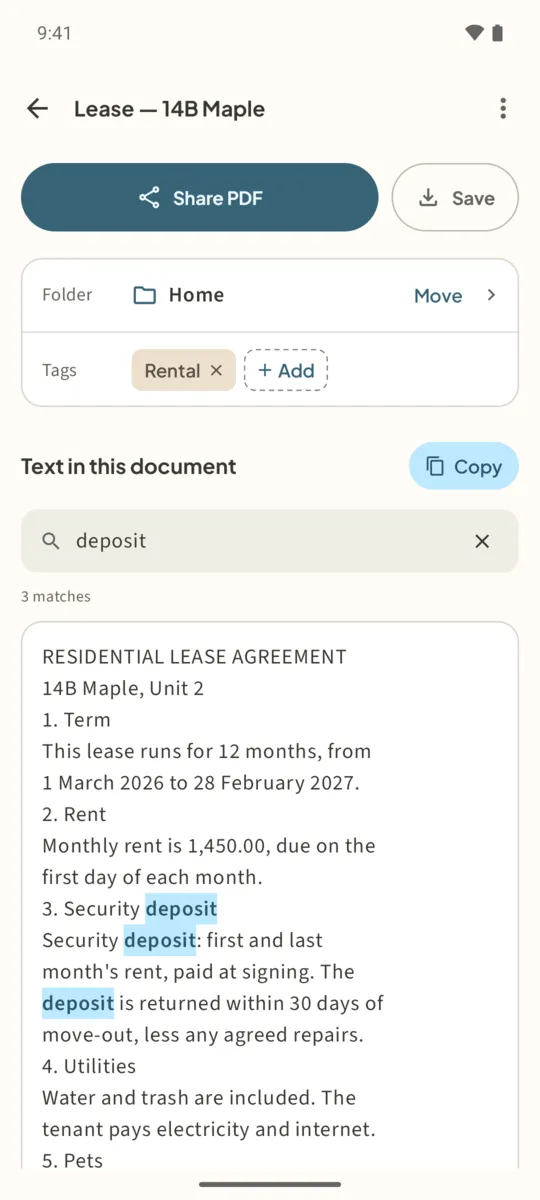
To your phone, a scanned page is a picture. You can look at it, but you cannot search “policy number” in it or paste a paragraph from it. Text recognition, often called OCR, reads the letters on the page and turns them into text.
Filetray runs text recognition on the device, with Google’s on-device text recognition. Pages are never uploaded to read them, so it works without a connection once the recognition model is on your phone. Google Play services may download that model the first time.
What the text is used for
- Search. The library search finds documents by the words on their pages.
- Find in a document. Find in this document highlights every match in the text.
- Copy. Copy puts the recognized text on the clipboard.
- Searchable PDF. The PDF you share or save keeps the text as a hidden layer, so other PDF apps can search it too.
How to read the text on a scan
- Scan the paperTap Scan a document and scan the pages. Flat, well-lit, upright pages read best.
- Open Text in this documentFiletray opens the new document. Scroll to Text in this document.
- Tap Read textWith Filetray Lifetime the text is read automatically after every scan and you can skip this step. On the free version, tap Read text; the free library includes this on one document. A Reading text badge shows while it works.
- Check the resultThe recognized text appears under the heading, with Show all text for long documents. Read it over before you rely on a number or a name.
- Find or copyType in Find in this document to highlight every match, or tap Copy to copy the recognized text.
- Share the searchable PDFTap Share PDF or Save. The PDF carries the recognized words as a hidden text layer.
Honest limits. Text recognition reads Latin-script languages, such as English, Spanish, French, Italian, Portuguese and German. It is built for printed text; handwriting, faint copies and very small print may come out wrong or not at all. If nothing is found, Filetray says “No text was found on these pages.”
Free and Lifetime
The free version reads the text of one document of your choice, and keeps reading pages you add to that same document. On any other document it says “Free text reading is already used on another document. Lifetime reads the whole library.” Filetray Lifetime, a one-time purchase, reads every document automatically.
Already have a scanned PDF?
Filetray reads pages you scan or import from photos. To run OCR on a PDF file that is already on your phone, use ViaPDF’s OCR tool, which saves a searchable copy of an existing PDF.
Scan it once. Find it later.Free to download, free for up to 5 documents. Filetray Lifetime is a one-time purchase, and Google Play shows your local price.
OCR scanner, offline: questions
Does OCR work in airplane mode?
Yes, once the recognition model is on the phone. Google Play services may need a connection to download it the first time.
Will it read handwriting?
It is built for printed text. Neat handwriting sometimes comes through, but do not count on it.
Which languages does it read?
Latin-script languages, such as English, Spanish, French, Italian, Portuguese and German. Scripts such as Chinese, Japanese, Korean, Arabic or Cyrillic are not read.
Is the text uploaded to read it?
No. Text is read on this phone. Nothing is uploaded.