Why scan a receipt the day you get it
Thermal receipts fade, warranty cards get lost, and a claim usually needs the date and the store. A scan keeps both, and with the words read you can search for the store name, the model or the serial number instead of remembering where you put it.
Filetray works well for this because it is a library, not just a camera: one folder for warranties, tags for the room or the car, and search over the words on the page.
Set up a receipts and warranties folder
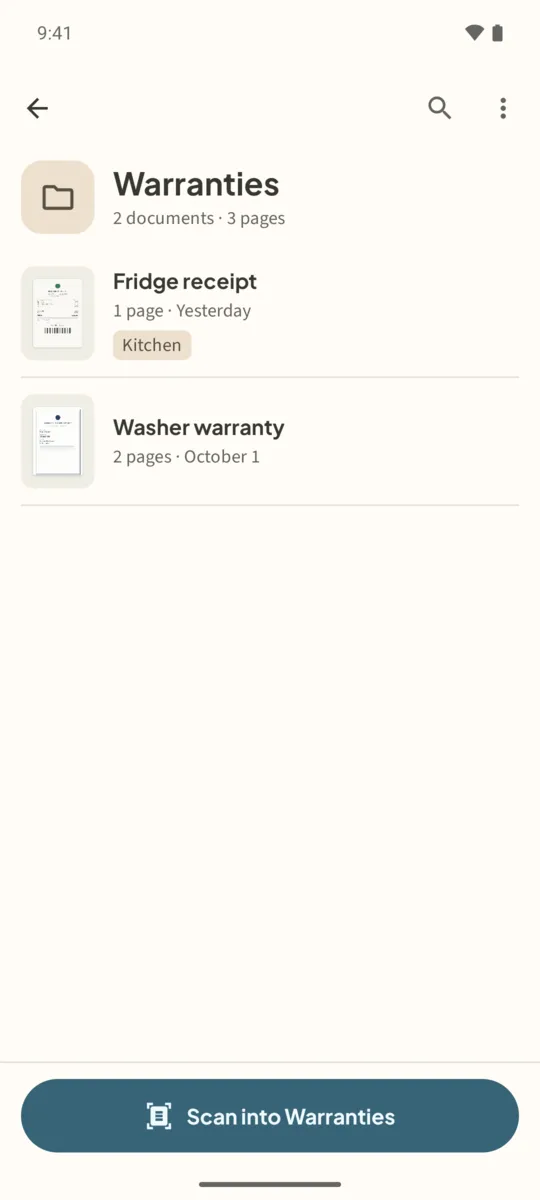
- Make a Warranties folderIn the Folders row, tap New, name it Warranties (or Receipts) and tap Create.
- Scan into the folderOpen the folder and tap Scan into Warranties. Scan the receipt, then the warranty card or the manual page with the serial number in the same scan, so they stay one document.
- Name it after the thingTap the pencil and name the document after the item: Fridge receipt, Washer warranty.
- Tag itOn the Tags row, tap Add and add a tag such as Kitchen or Car.
- Find it when you need itSearch for the store, the brand or the model number. Open the match and tap Share PDF to send it with your claim.
Tips for receipts
- Scan thermal receipts early; they fade with heat and light.
- Long receipts read better in two overlapping pages than one tiny one.
- Check the recognized total and date before you rely on them in a claim.
Free or Lifetime? The free library holds 5 documents, with text recognition on one. For a drawer full of receipts, Filetray Lifetime removes the cap and reads every document, for a one-time price that Google Play shows in your currency.
Scan it once. Find it later.Free to download, free for up to 5 documents. Filetray Lifetime is a one-time purchase, and Google Play shows your local price.
Receipts and warranties: questions
Is Filetray an expense tracker?
No. It keeps the receipt as a searchable PDF in a folder. It does not add up totals or export expense reports.
Can I keep the receipt and the warranty together?
Yes. Scan them in the same session, or add pages later from Pages with Scan more pages, and they are one PDF.
Will it read the total on a faded receipt?
Maybe not. Faded thermal paper is hard for any text recognition. Scan receipts while they are fresh, and give them a clear title and tags.