What people usually want instead
People who look for a CamScanner alternative tend to ask for the same things: a scanner without a subscription, without a watermark on the PDFs they pay for, and without uploading their papers to an account. Check the current plans of any app on its own store listing; this page only describes Filetray.
How Filetray handles those
| What you asked for | Filetray |
|---|---|
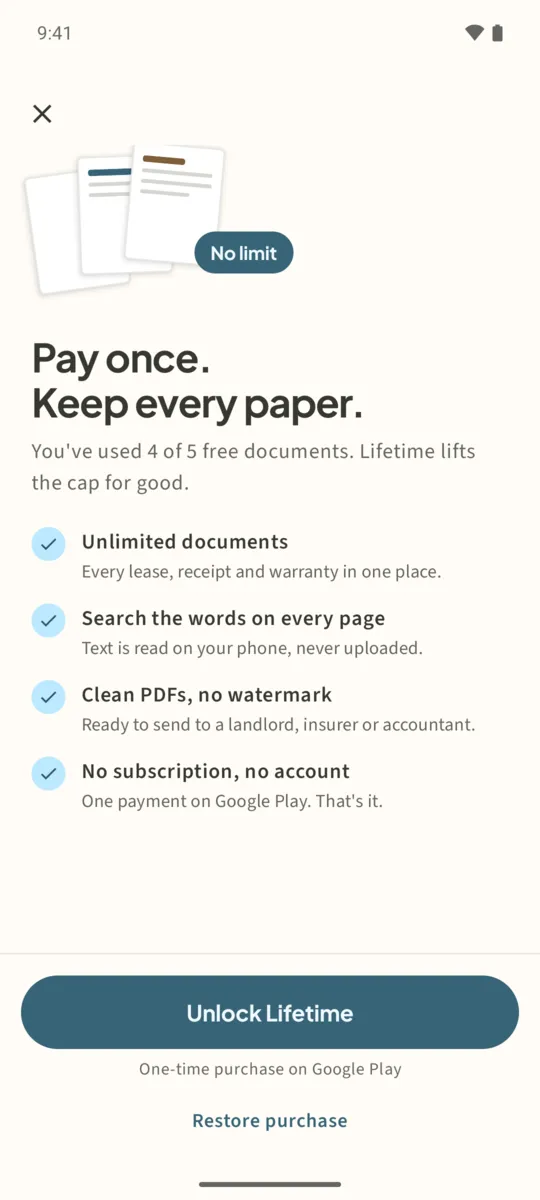
| No subscription | Filetray Lifetime is a one-time purchase on Google Play. Google Play shows your local price. |
| No watermark | Lifetime PDFs are clean. Free PDFs carry a small “Made with Filetray” footer, not a stamp across the page. |
| No account, no upload | No sign-in. Text recognition runs on the phone; pages are never uploaded to read them. |
| OCR you can search | Search titles, tags, folder names and the words inside your scans. Lifetime reads every document. |
| Folders and tags | Included in the free version. |
| Try before paying | Keep up to 5 documents free, with text recognition on one. |
Move your papers to Filetray
- Export what you already haveIn your current scanner, save the documents you want to keep as PDF or images to your phone.
- Re-scan the papers that matterFor paper you still have, tap Scan a document in Filetray. Filetray builds its library from pages you scan or pick from photos.
- Import imagesTap the photo button next to Scan a document to turn saved page images into a new document.
- Create foldersTap New in the Folders row for each pile: Home, Taxes, Warranties.
- Let it read the wordsWith Lifetime every document is read automatically. On the free version, tap Read text on the one document you want searchable first.
What Filetray does not do
Being clear about this saves you a refund request. Filetray does not sign, fill in or edit PDFs, does not fax, does not sync to a cloud account, and does not import existing PDF files into its library. It is a scanner and a searchable library for your papers.
If you need to work on PDF files you already have, such as merging, compressing or running OCR on them, ViaPDF is our offline PDF toolkit for Android.
Scan it once. Find it later.Free to download, free for up to 5 documents. Filetray Lifetime is a one-time purchase, and Google Play shows your local price.
CamScanner alternative: questions
Is Filetray free?
Free to download and free for up to 5 documents, with text recognition on one document. Filetray Lifetime unlocks unlimited documents, text recognition on every document and PDFs without the watermark.
How much is Filetray Lifetime?
It is a one-time purchase, and the price depends on your country. Google Play shows it on the unlock button before you buy.
Can I restore Lifetime on a new phone?
Yes. Install Filetray on the new phone with the same Google Play account and tap Restore purchase in Settings.
Can I import my old PDFs?
Not as PDFs. Filetray builds documents from pages you scan or pick from photos.