File names are not how people remember paper
Months after you scanned a lease, you remember the deposit clause, not whether you called the file “Lease”, “Apartment” or “Scan 3”. A search that only looks at titles finds nothing.
Filetray reads the words on your pages on the phone and keeps them with the document. The search box at the top of the library looks through titles, tags, folder names and that recognized text, all at once.
Search the words in your scans
- Make sure the text has been readWith Filetray Lifetime every document is read automatically. On the free version, open the document and tap Read text (free on one document). When its words are read, they show under Text in this document.
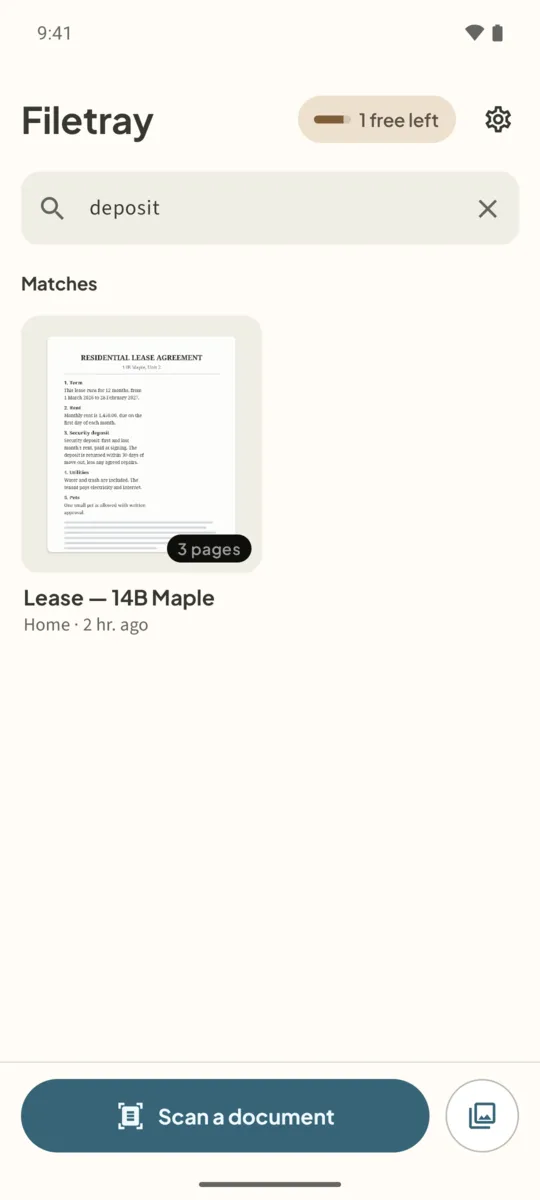
- Type in the library searchOn the library screen, tap Search titles and text inside and type a word, such as deposit.
- Open a matchDocuments that contain the word appear under Matches. Tap one to open it.
- Jump to the wordIn the document, type the word in Find in this document. Every match is highlighted, with the number of matches above the text.
- Search inside one folderOpen a folder and tap the search icon to search only that folder’s titles, tags and text.
When search finds nothing
- The document may not have been read yet. Open it and look at Text in this document.
- Try a shorter word, or a word that is printed large on the page, such as a company name.
- Recognition can misread faint or handwritten text. Tags help: add one such as Insurance or Car, and search finds it whatever the page says.
To organize documents so they are easy to browse as well as search, see organize scanned documents with folders and tags.
Scan it once. Find it later.Free to download, free for up to 5 documents. Filetray Lifetime is a one-time purchase, and Google Play shows your local price.
Search text in scans: questions
Does search work on the free version?
Yes. Search looks through titles, tags and folder names on every document. The words inside the pages are searchable on the document whose text was read; Filetray Lifetime reads every document.
Can other apps search my scans?
Inside Filetray, use the search box. PDFs you share or save keep the recognized text as a hidden layer, so other PDF apps can search those files too.
Is the search done online?
No. The text and the search stay on your phone.