Android and iPhone
Calculator vault apps vs real encryption
A calculator vault hides the app behind a fake icon. Encryption protects the files. These are two separate questions, and Escondo answers only the second one.
Two questions, not one
- Can someone see the app? A disguise answers this: the icon looks like a calculator.
- Can someone read the files? Only encryption answers this: the files are scrambled under a key the other person does not have.
A disguise changes what the home screen shows. It does not change how the files are stored. If a vault app disguises its icon but keeps your photos as ordinary files, the disguise is all there is between them and a reader.
What Escondo does instead
- Every file, the file list (names, folders, dates, sizes) and the thumbnails are encrypted with AES-256-GCM.
- The vault key is random, made on your phone, and wrapped by a key made from your pattern and a secret held in the phone's secure hardware, and by a key made from your 9 recovery words.
- Escondo does not hide its icon. Android 10 and later cannot hide app icons, and a fake icon is not a lock.
What to ask of any vault app
- Does it say its files are encrypted, and how? "Hidden" and "locked" are not the same as encrypted.
- Whose key is it? Is the key made from your pattern or password, or kept somewhere you cannot see?
- Does it need an account or the internet? Escondo needs neither.
- Can you export everything, for free, in your own files?
- What happens if you forget the password? A vault that anyone can reset can be opened by someone else too.
What Escondo gives you for the "someone is watching" case
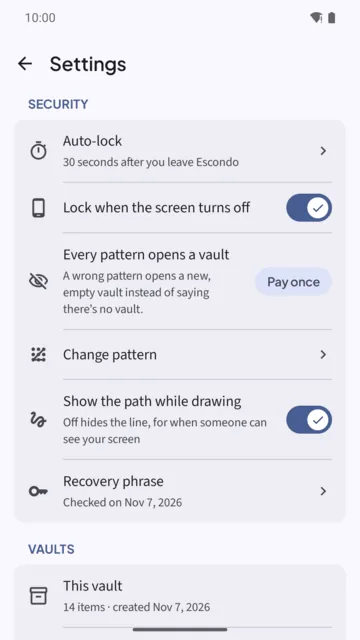
The paid option Every pattern opens a vault makes a wrong pattern open a new, empty vault instead of an error, so a person watching you unlock cannot tell a real vault from a decoy. A duress vault looks like any other vault and erases the others when opened. See Decoy vault: if someone makes you unlock it.
They are not invisibility. Someone who can read the phone's files, not just the screen, can still tell that Escondo is installed, that deniability is on, and roughly how many vaults exist and how big they are.
Common questions
Does Escondo have a calculator disguise?
No. Escondo does not hide its icon. Android 10 and later cannot hide app icons, and a disguise is not a lock.
Is a calculator vault encrypted?
It depends on the app. A disguised icon says nothing about how the files are stored, so look for a plain statement about encryption and about who holds the key.
What does Escondo encrypt?
Every file, the list of files and the thumbnails, with AES-256-GCM, under keys derived from a vault key made on your phone.
Can someone tell Escondo is on my phone?
Yes. The icon is visible, and someone with file-level access can see that Escondo is installed.
Where are the limits listed?
The security page lists what Escondo does not protect against.
Related guides
- Decoy vault: if someone makes you unlock itAndroid and iPhone
- How to hide photos on AndroidAndroid
- How to lock photos on iPhone (Hidden album vs a vault)iPhone
- Offline photo vault: no account, no cloudAndroid and iPhone
- Escondo app page
- How Escondo protects your files (security page)