Android
How to hide photos on Android
Escondo hides photos on Android by encrypting them, not just moving them to another folder. You draw a pattern, move your photos in, and Android removes the originals from your gallery once you confirm.
Watch it in 25 seconds
The steps in a short video. It loads from YouTube only when you press play.
Before you start
You need Android 8 or later. There is no account to make. The free vault holds 100 photos, 10 videos and 25 other files, with no time limit. Export, backup and restore are always free.
Each photo is encrypted on the phone with AES-256, and only your pattern (or the 9 recovery words) opens the vault.
Create your vault
- Open Escondo and tap Create my vault. Three short intro pages come first. You can tap Skip.
- Draw a pattern. Use 6 dots or more and change direction at least once. Draw it again to confirm it.
- Write down the 9 words. On paper, in this order. They open this vault if you forget the pattern, and they open its backup files. Tap I wrote them down.
- Check your phrase. Type three of your words. If you tap Later instead, the vault holds up to 10 items until you check the phrase.
Move your photos in
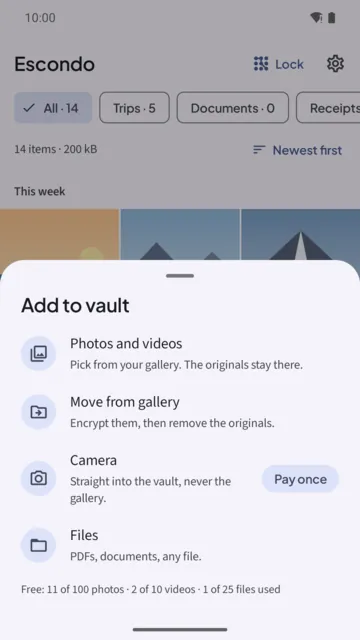
- Tap Add, then Move from gallery. The sheet says: Encrypt them, then remove the originals.
- Allow access to photos. All of them, or only the ones you pick. Escondo needs to see them to move them.
- Choose what to move. Photos, as many as you like. Then tap Continue and Move.
- Keep Escondo open until it finishes. It encrypts each file and checks it. Nothing is removed before every file is checked in the vault.
- Confirm the delete. Android shows its own delete dialog once. Confirm it and Android removes the originals from your gallery.
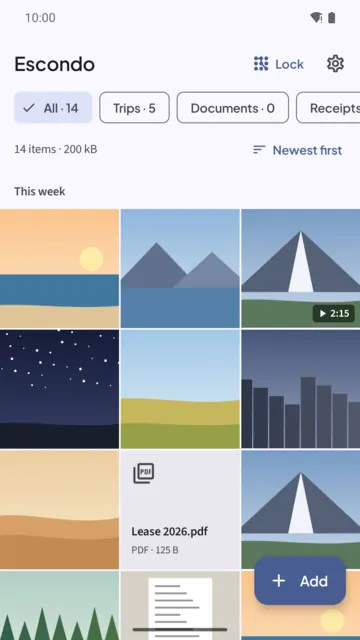
- Read the result. Escondo says how many items it moved and that the originals were deleted from the gallery.
If you want copies instead of a move
Choose Photos and videos instead. It says: Pick from your gallery. The originals stay there. If you do not allow photo access, Escondo adds copies and tells you to open your gallery to delete the originals.
Check for other copies
Copies that are already in Google Photos or another cloud stay there. Escondo cannot remove them, so delete them in that app if you want them gone.
Locking and screenshots
Escondo locks 30 seconds after you leave the app (you can change that, or lock right away) and when the screen turns off. Screenshots are blocked and the recent apps card stays blank.
If you only need a quick hide
Many phones have a built-in option, such as the Locked Folder in Google Photos or Samsung's Secure Folder. How they work depends on your phone, its screen lock and the app version, so check what yours does before you rely on it. Escondo is a separate vault with its own pattern and its own encryption, and it works the same on any phone with Android 8 or later.
Common questions
Can I hide photos without deleting the originals?
Yes. Use Add, then Photos and videos. It adds copies and the originals stay in your gallery.
Do photos lose quality?
No. Originals are stored untouched, with no quality loss, and they come back out at full quality when you export.
What if I forget the pattern?
Use the 9 recovery words. On the unlock screen, tap the recovery phrase link, type the words, and draw a new pattern. Without the pattern and the words, nobody can open the vault, not even us. See Forgot your vault pattern?
What happens if I uninstall Escondo?
Uninstalling Escondo deletes the vault on that phone, not your backup files. Create a backup file first and keep it somewhere safe.
Does Escondo need the internet?
No. The Android app has no internet permission and the iPhone app makes no network requests. Nothing is uploaded.
Is it free?
The free vault holds 100 photos, 10 videos and 25 other files, with no time limit. Export, backup and restore are always free. Pay once to remove the limits. It never turns into a subscription.
Related guides
- How to hide videos on AndroidAndroid
- Offline photo vault: no account, no cloudAndroid and iPhone
- Forgot your vault pattern? How to get back inAndroid and iPhone
- Move hidden photos to a new phone (Android and iPhone)Android and iPhone
- Escondo app page
- How Escondo protects your files (security page)