Android and iPhone
Move hidden photos to a new phone
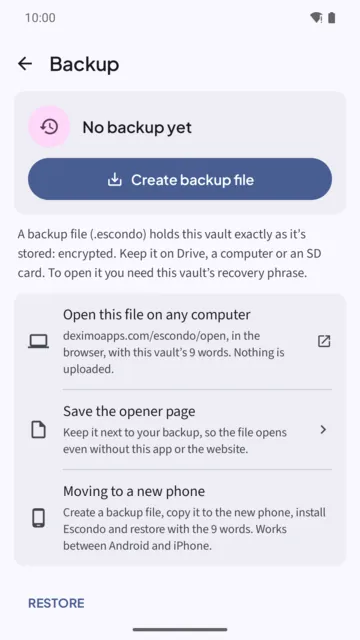
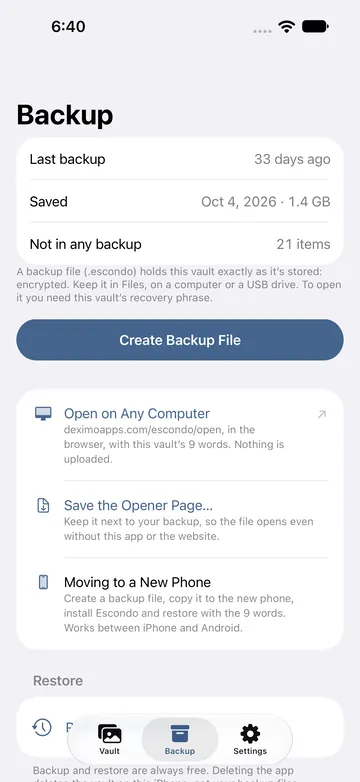
The vault does not move with your phone's own backup or transfer. You create a backup file in Escondo, copy it to the new phone, and restore it with your 9 words. It works between Android and iPhone.
Why a backup file
On Android the app is excluded from cloud backup and from phone-to-phone transfer. On iPhone the vault is excluded from iCloud and Finder backups, so a restore onto a new iPhone shows an empty app. The backup file is how a vault moves.
On the old phone
- Open the Backup tab and tap Create backup file. A backup file (.escondo) holds the vault exactly as it is stored: encrypted. Nothing is decrypted to make it, so locking the vault does not stop it.
- Save it somewhere you can reach from the new phone. On Android: Drive, a computer or an SD card. On iPhone: it is saved through Files, for example to iCloud Drive, or a computer or a USB drive.
- Wait for "Backup saved".
On the new phone
- Install Escondo and copy the backup file to the new phone.
- Tap Restore from a backup. It is a text button on the last intro page, and also in the Backup tab as Restore from a backup file.
- Choose the file and type the vault's 9 words. Then tap Unlock backup.
- Wait while Escondo copies and checks every file. The backup file is not changed. If anything fails, nothing is added to the phone.
- Draw a new pattern. The message says: Restored N items. Draw a pattern to open this vault on this phone. The pattern is bound to the new phone.
Things to know
- Backup and restore are always free.
- You need the 9 words of that vault. The old pattern does not work on the new phone.
- Do not wipe the old phone until you have opened the vault on the new one.
- If the same vault is already on the phone, Escondo asks whether to replace the copy on the phone with the backup.
- A backup file can be many gigabytes. Leave time for the copy.
- The backup file is encrypted, but anyone who has it and the 9 words can open it. Keep both apart.
Common questions
Can I move a vault from Android to iPhone?
Yes. The backup file works between Android and iPhone, and between iPhone and Android.
Does Escondo transfer automatically when I set up a new phone?
No. The vault is excluded from Android's transfer and from iCloud and Finder backups. Use a backup file.
What do I need on the new phone?
The backup file and the 9 words of the vault. Then you choose a new pattern.
Does restoring cost anything?
No. Backup and restore are always free.
How do I check my backup?
Open it on a computer with Escondo Open. Nothing is uploaded.
Related guides
- Forgot your vault pattern? How to get back inAndroid and iPhone
- Open a photo vault backup on a computerAndroid and iPhone
- Offline photo vault: no account, no cloudAndroid and iPhone
- How to hide photos on iPhoneiPhone
- Escondo app page
- How Escondo protects your files (security page)