Android and iPhone
Open a photo vault backup on a computer
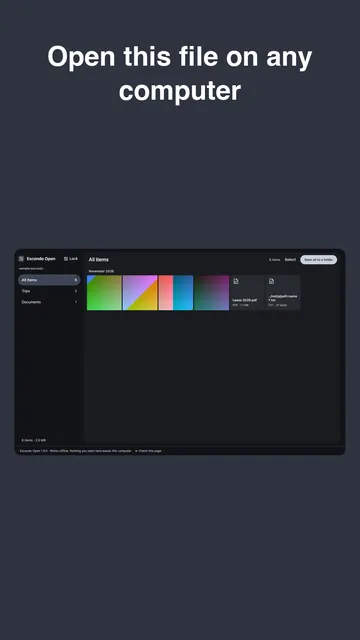
An Escondo backup opens in any modern browser on a computer, with the vault's 9 words, even without the app. The page works with the network off and cannot send anything anywhere.
Watch it in 26 seconds
The steps in a short video. It loads from YouTube only when you press play.
What you need
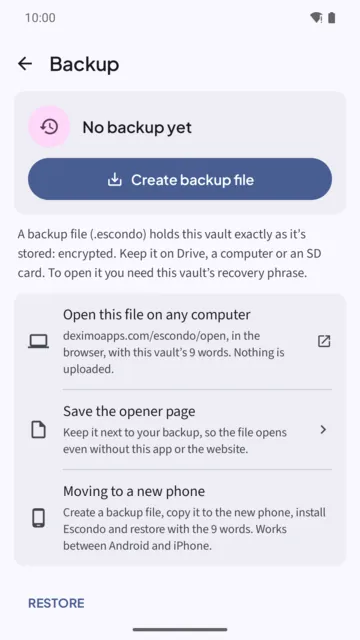
- The backup file (.escondo) from Escondo's Backup screen.
- The 9 words of that vault.
- A computer with an up-to-date Chrome, Edge, Firefox or Safari.
Steps
- Copy the backup file to the computer. On Android it can be on Drive, a computer or an SD card. On iPhone it was saved through Files, for example in iCloud Drive.
- Open Escondo Open in the browser. Go to deximoapps.com/escondo/open, or open the copy of the page that Escondo saved next to the backup.
- Drop the file on the page, or choose it. The page says "Drop a .escondo file here".
- Type the 9 words. The page counts them: "n of 9 words". Then tap Unlock backup.
- Browse and save. Photos and videos open in the page. Save all to a folder, Save selected, or Save one at a time.
What stays private
Everything happens in the browser tab. The backup file is not changed, and the page cannot send anything: its content policy forbids any network request. The page is one plain HTML file you can read with View Source.
Saving files
Chrome and Edge can save everything to a folder. Other browsers save one file at a time, and some ask to allow several downloads; choose Allow. A damaged file is skipped and the others still open.
Keep your own copy of the page
In Backup, "Save the opener page" keeps a copy next to your backup, so the file opens even without the app or this website. That copy is the one to trust most, because it does not depend on this site. The page also shows how to check its SHA-256 against the versions list.
On a phone
A backup can be many gigabytes, more than a phone browser handles well. On a phone, restore it in the Escondo app with the same 9 words.
Common questions
Do I need the Escondo app to open a backup?
No. A computer with a browser and the vault's 9 words is enough.
Is my backup uploaded?
No. It is opened in the browser tab and nothing leaves the computer. The page works with the network off.
Does it work with Safari or Firefox?
It works in an up-to-date Chrome, Edge, Firefox or Safari. Chrome and Edge can save everything to a folder; other browsers save files one at a time.
What if the website is gone one day?
Use the copy of the page that Escondo saved next to your backup. It is the same plain HTML file.
Can I use the pattern instead of the words?
No. The pattern works only on the phone where it was made. The 9 words open a backup anywhere.
Related guides
- Move hidden photos to a new phone (Android and iPhone)Android and iPhone
- Offline photo vault: no account, no cloudAndroid and iPhone
- Forgot your vault pattern? How to get back inAndroid and iPhone
- How to hide videos on AndroidAndroid
- Escondo app page
- How Escondo protects your files (security page)