Android and iPhone
Decoy vault: if someone makes you unlock it
Escondo has two options for the moment someone watches you unlock or asks you to. Both are part of the Pay once purchase. This guide says what each does, how to set it up, and what it does not hide.
Watch it in 23 seconds
The steps in a short video. It loads from YouTube only when you press play.
Option 1: every pattern opens a vault
Normally a pattern with no vault shows "No vault for this pattern". With Every pattern opens a vault turned on, a wrong pattern opens a new, empty vault instead. Nothing on screen shows which patterns are real. With it on there is also no lockout, because a lockout would reveal a wrong pattern.
- Open the vault and go to Settings.
- Turn on Every pattern opens a vault. It is a Pay once option.
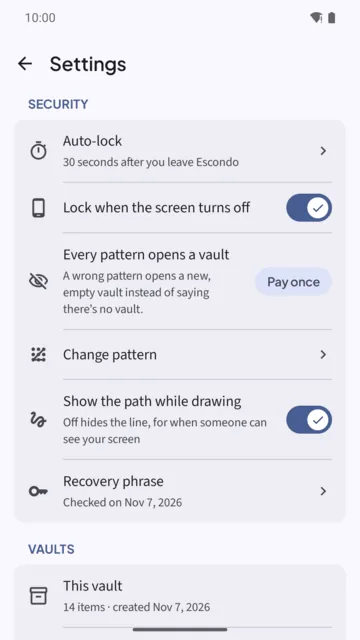
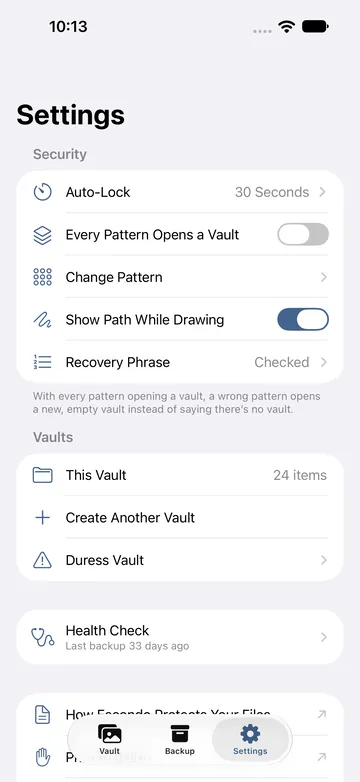
Option 2: a duress vault
A duress vault looks like any other vault. The moment it is opened, every other vault on this phone is erased. Nothing inside it shows that it is a duress vault. The erase is instant and permanent, and it cannot be undone. Backup files you saved elsewhere are not touched, so keep one up to date.
- Open Settings and tap Duress vault. Read the warning and tick that you understand opening it erases every other vault on this phone.
- Draw a new pattern for it. On Android the button is Draw duress pattern; on iPhone it is Set Up Duress Vault.
- Write down its recovery phrase. It has its own 9 words.
- Add a few ordinary photos so it looks used.
What this hides, and what it does not
With these options, a person who watches you unlock cannot tell a real vault from a decoy, and cannot tell which vault is the duress vault. They cannot read any file or name.
It does not hide everything. Someone with access to the phone's files, not just the screen, can still see:
- that Escondo is installed and that deniability is on;
- roughly how many vaults exist, and how many files each holds and how large they are.
They cannot tell which vault is the duress vault. With deniability on there is no lockout, so a patient person holding one unlocked vault could probe patterns through Create and Change pattern, slowly: each try waits at least 1.5 seconds.
What an app cannot do
Deniability is about the screen and a casual or coerced look, not about someone who examines the storage. If someone forces you to open the real vault, or watches you draw your real pattern, no app can prevent that. The security page lists the limits.
Common questions
Is the decoy free?
Both options, Every pattern opens a vault and the duress vault, are part of the Pay once purchase.
What does the duress vault do?
When it is opened, every other vault on this phone is erased. It is instant and permanent. Backup files saved elsewhere are not touched.
Can someone tell which vault is the duress vault?
No. Its flag is stored inside its own encrypted file list, and nothing inside it shows that it is a duress vault.
What can someone with access to the phone's files see?
That Escondo is installed, that deniability is on, and roughly how many vaults exist and how large they are. They cannot read any file or name.
Is there a lockout when deniability is on?
No, because a lockout would reveal a wrong pattern. With it off, 5 wrong patterns start a wait of 30 seconds that grows to 5 minutes.
Related guides
- Calculator vault apps vs real encryptionAndroid and iPhone
- Forgot your vault pattern? How to get back inAndroid and iPhone
- How to lock photos on iPhone (Hidden album vs a vault)iPhone
- Photo vault app with no subscriptionAndroid and iPhone
- Escondo app page
- How Escondo protects your files (security page)