iPhone
How to lock photos on iPhone: Hidden album vs a vault
iPhone already has a way to hide photos. An encrypted vault is a different tool. This guide shows both and says plainly what each one does, so you can pick the one that fits.
Option 1: the Hidden album in Photos
- Open the photo in Photos.
- Tap the ... menu, then Hide. Confirm when iPhone asks.
- Find it later in the Hidden album. The album is locked with Face ID, Touch ID or your passcode by default (Settings, under Photos). In Settings, under Photos, you can turn off Show Hidden Album to take it out of the album list.
This takes a few seconds and needs no app. The photo stays a normal item in your Photos library: with iCloud Photos on, hidden photos are part of what syncs between your devices.
Option 2: an encrypted vault
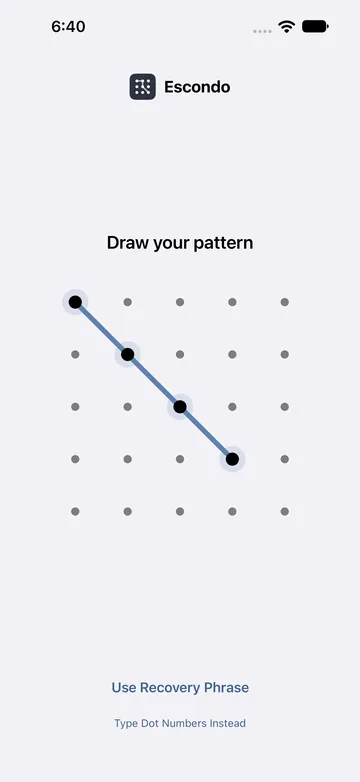
Escondo takes the photo out of Photos and stores it encrypted, behind a pattern you draw. The key that opens the vault comes from your pattern and a secret held in the iPhone's secure hardware, so the pattern does not open anything on another device.
- Open Escondo and tap Create Vault. Three short intro pages come first. You can tap Skip.
- Draw a pattern. Use 6 dots or more and change direction at least once. Draw it again to confirm it.
- Write down the 9 words. On paper, in this order. Do not take a screenshot: iPhone cannot block screenshots here, and it would save the words in Photos. Tap I Wrote Them Down.
- Check your phrase. Type three of your words. If you tap Later instead, the vault holds up to 10 items until you check the phrase.
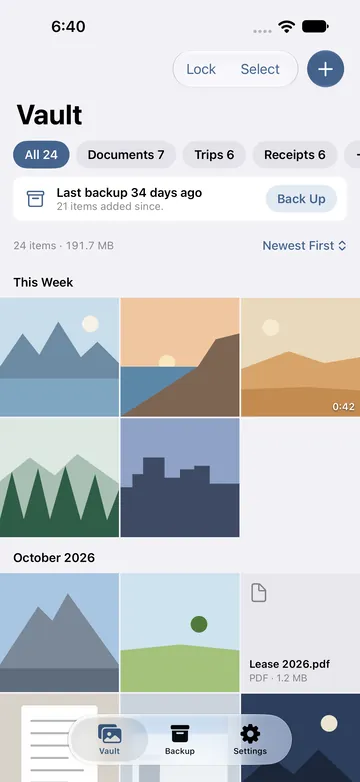
- Tap the plus button, then Move from Photos. The menu says: Removes the originals.
- Allow access to photos. All of them, or only the ones you pick. Full access is never required: with limited access, tap Manage, then Select More Photos.
- Choose what to move. Photos, as many as you like. Tap Move.
- Wait while Escondo encrypts and checks each one. Keep Escondo open until it finishes.
- Confirm the delete. iPhone asks once. The originals go to Recently Deleted for 30 days.
- Empty Recently Deleted. Open the Recently Deleted album in Photos and delete them there. Until you do, the originals can still be opened from that album.
Side by side
| Hidden album | Escondo vault | |
|---|---|---|
| Where the photo lives | In your Photos library | Encrypted inside Escondo, removed from Photos |
| What opens it | Face ID, Touch ID or passcode | A pattern you draw; the 9 recovery words if you forget it |
| iCloud Photos | Syncs with the rest of your library | The vault is excluded from iCloud and Finder backups |
| Moving to a new phone | Through iCloud Photos or your usual transfer | A backup file you save yourself and restore with the 9 words, on iPhone or Android |
| If you forget how to open it | Apple's passcode and Face ID options apply | The 9 words are the only way back; nobody can reset them |
Which one should you use?
If you only want a photo out of the way when someone scrolls your library, the Hidden album is quick. If you want the files encrypted under a key that is yours, kept out of iCloud, exportable and backed up in a file you control, use a vault. You can use both.
One limit applies to every vault app on iPhone: iOS cannot block screenshots. Escondo covers the screen in the app switcher and while the screen is recorded, and it tells you when a screenshot is taken. And a vault does not delete copies that already exist in iCloud Photos or a messaging app.
Common questions
Is the Hidden album locked on iPhone?
Yes, by default it is locked with Face ID, Touch ID or your passcode. In Settings, under Photos, you can turn that lock off, and turn off Show Hidden Album to take it out of the album list.
Do hidden photos still sync to iCloud?
Yes. They stay in your Photos library, and with iCloud Photos on they are part of what syncs.
Do photos in Escondo go to iCloud?
No. The vault is excluded from iCloud and Finder backups, and Escondo makes no network requests.
Which photos does the vault remove from Photos?
The ones you move. They go to Recently Deleted for 30 days; empty that album to remove them.
Is it free?
The free vault holds 100 photos, 10 videos and 25 other files, with no time limit. Export, backup and restore are always free. Pay once to remove the limits. It never turns into a subscription.
Related guides
- How to hide photos on iPhoneiPhone
- How to hide videos on iPhoneiPhone
- Calculator vault apps vs real encryptionAndroid and iPhone
- Decoy vault: if someone makes you unlock itAndroid and iPhone
- Escondo app page
- How Escondo protects your files (security page)