Why memory books get abandoned, and how an app fixes it
Ask around and you will hear the same story: the beautiful baby book that stops at month three. The problem is not motivation, it is batching. Paper books ask you to sit down, find the photos, print them, remember what happened and write it out neatly. Nobody with a newborn has that hour.
A baby memory book app flips the workflow. You capture the moment when it happens (ten seconds), and the layout, dating and chapter organisation are done for you. When you want the physical object, you export it.
Everkeep is designed around this: the home screen is capture-first, the Archive is already organised into month chapters, and the Pro export turns those chapters into a PDF book.
What to put in a baby memory book
Dates matter less than stories. The entries you will treasure in twenty years are:
- The story behind each first: where you were, who saw it, how you reacted.
- Their voice: babbling, first words, the way they said “lellow”. Record it as a voice memory.
- Ordinary days: the bath routine, the favourite spoon, the walk to the park. These fade fastest.
- Letters to them: a note at each birthday about who they are right now.
- Paper that would otherwise be lost: the hospital bracelet, the daycare note, the first drawing. Photograph it; Everkeep can even scan the text so it is searchable.
See our full list of baby journal prompts if you want more ideas.
What the Everkeep memory book looks like
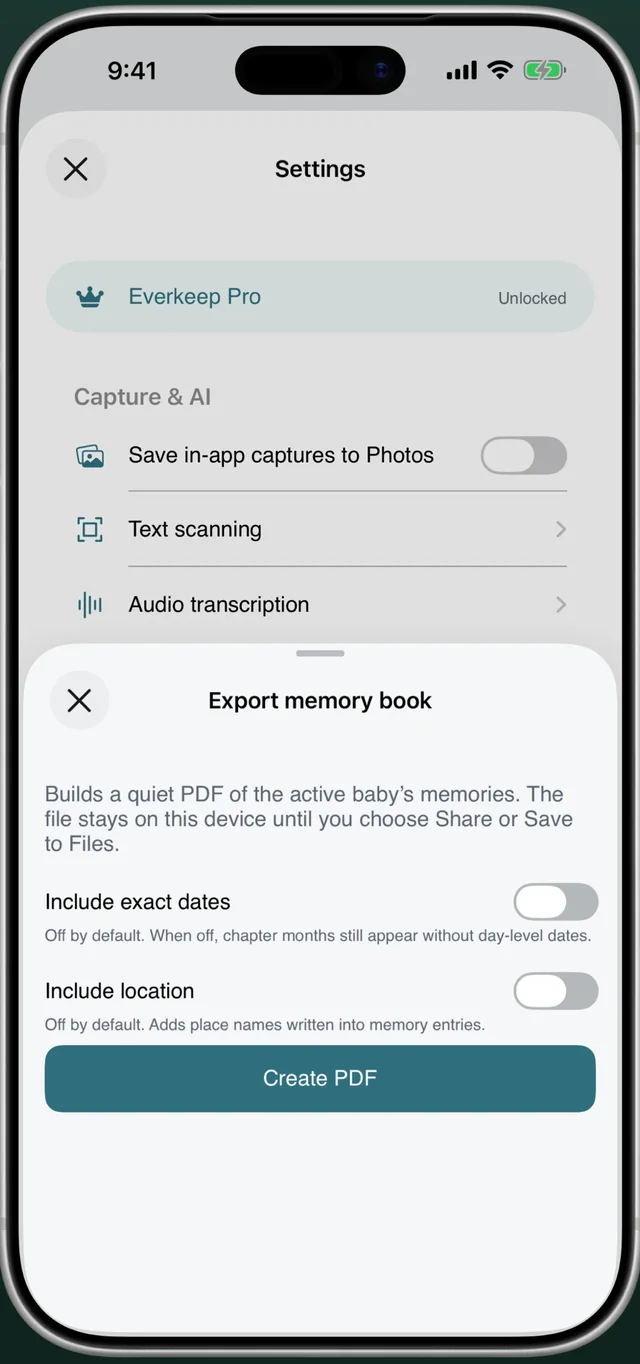
Everkeep Pro builds a quiet, clean PDF from your active baby’s memories: a cover, then a chapter for each month with your photos, titles and the notes you wrote. Video memories appear as stills. Two privacy toggles let you choose whether exact day-level dates and place names are printed; both are off by default, so the book reads as “3 months · July 2024” unless you want more detail.
The file is created on your phone and stays there until you choose Share or Save to Files. From there you can print it at home, send it to a print shop, AirDrop it to grandparents or archive it alongside your photos.
One-time, not monthly. Everkeep Pro is a single $9.99 purchase and includes the PDF memory book, memory movie export, unlimited child profiles and Looking Back. Compare that with $50–$80 per year for most book-building apps.
How to make a baby memory book in Everkeep
Capture as you go, then export whenever you like: after the first year, every birthday, or all at once.
- Set up your baby's profileInstall Everkeep and enter your baby’s name and birthday. Every memory will be labelled with their age, which becomes the chapter structure of the book.
- Capture moments as they happenUse the Photo, Video, Voice and Note buttons. Add a title and the story. Aim for a couple of entries a week; there is no daily pressure.
- Add earlier photos and backdate themPull in photos from your camera roll and set “When did this happen?” to the real date so they land in the correct month chapter.
- Star your favouritesTap the star on the memories you love most. Favorites make it easy to review the highlights before you export.
- Unlock Everkeep ProOpen Settings and unlock Everkeep Pro with a one-time purchase. It is shareable with your family group via Family Sharing.
- Export the PDF memory bookIn Settings, choose Export memory book. Decide whether to include exact dates and locations, then tap Create PDF. Save it to Files, print it or share it.
Start your baby memory book todayFree to capture. $9.99 once for the book. Nothing ever leaves your phone unless you say so.
Baby memory book FAQ
Can I print the Everkeep memory book?
Yes. The export is a standard PDF, so you can print it at home, upload it to any online print service or take it to a local print shop. Everkeep itself does not sell printing, so you are free to choose the paper and binding you like.
Can I make more than one book?
Yes. Export as often as you like: after year one, at each birthday, or a fresh complete book whenever you want. Each export reflects the current state of your journal.
Does the PDF include voice recordings?
A PDF cannot play audio, so voice memories are counted in each chapter but not played back. Your recordings stay in the app and in your backup. For a keepsake that includes sound and motion, Everkeep Pro also exports a memory movie (MP4).